SIS vs ERP for K-12 Admin Workflows
Choosing between systems designed for different jobs prevents costly workflow gaps.

- Written by
- Preston Ganem
- Updated
- October 21, 2026
- Reading time
- 9 min read
- Sources cited
- 7 sources ↓
What this covers
Vendors throw around SIS, ERP, and "school management software" like they're interchangeable. They're not, and the confusion can cost your district real money. If you buy an ERP hoping it will replace a student records system, or buy a SIS expecting it to cut payroll checks, you end up with an expensive hole where a workflow used to be.
Quick definitions before anything else: a SIS is the system of record for student data (enrollment, grades, attendance, transcripts, scheduling). An ERP runs the business side of a district (finance, HR, payroll, procurement, asset management). School management software usually sits in between, bundling student-facing tools with parent communication and lighter admin features. None of these is more comprehensive than the others. They just own different territory. The actual question your district needs to answer is which workflows are currently falling through the cracks.
What a SIS Owns in K-12
Everything in a SIS traces back to one job: tracking a student from the day they apply to the day they graduate. That organizing logic drives every feature, and it's worth keeping in mind when a vendor tries to sell you add-ons that deviate from this purpose.
The core functions break down like this:
Enrollment and admissions. Online applications, document collection, acceptance workflows, enrollment confirmation. This is the first thing families interact with.
Attendance. Period-by-period tracking, automatic absence notifications to parents, and the compliance reporting that state agencies actually check.
Grading and transcripts. Teachers enter grades, the system calculates GPA, and report cards or transcripts generate without someone manually retyping numbers into a spreadsheet.
Scheduling. Room assignments, teacher availability, course requests, conflict resolution. Building a master schedule by hand is one of the most labor-intensive recurring tasks in a school building, and a SIS automates most of it.
Parent and student portals. Real-time access to grades and attendance reduces front-office phone calls, because parents can log in instead of contacting the school repeatedly.
What a SIS does not do is just as important. It does not run payroll, it does not process purchase orders, and it was never designed to. Where a SIS does carry real weight is compliance: accurate attendance data feeds state reporting and funding formulas, and having that generate automatically rather than through manual compilation reduces audit risk in a way that matters at the district leadership level.
What an ERP Owns in K-12 Districts
Where a SIS serves teachers, registrars, and families, an ERP serves your district office: finance directors, HR staff, procurement leads, and operations teams. No one in a classroom typically touches it, and that division is intentional.
The core functions:
Finance and accounting. Budget management, accounts payable and receivable, financial reporting, fee collection.
HR and payroll. Employee records, recruitment, staff attendance and leave, performance evaluation, payroll processing.
Procurement and inventory. Purchase orders, asset tracking, reordering, supply management.
Internal controls. Split-level authorization for purchasing, expenditure encumbrance against approved budgets, and audit trails that cannot be edited after the fact. These controls are what prevent fund mismanagement and administrative fraud from going undetected.
Tyler Technologies builds its School ERP specifically around finance, HR and payroll, procurement, and reporting for districts, which is a useful reference point for what "K-12 ERP" means in practice. An ERP can integrate with SIS data, but it remains a back-office system. Student-facing work stays with the SIS. Full ERP suites also tend to appear at the multi-school district level rather than in a single building. A standalone elementary school rarely has the budget, staff, or operational complexity to justify the implementation effort.
Workflows That Fall Between Both Systems
Some of the most consequential workflows in a district do not belong cleanly to either system.
Student activity funds are the clearest example: field trips, athletics, childcare, library fines, and fundraising. Millions of dollars move through these accounts across a district every year, and neither ERP-level district accounting nor a SIS was designed to handle them. Neither system was built to track a small field trip deposit collected by a classroom teacher.
Transportation routing presents the same problem from a different angle. Routing platforms need current enrollment data to build bus routes, but without a SIS integration, transportation staff end up manually re-entering student data and catching mid-year changes themselves: transfers, new enrollments, and address updates. That manual process is a predictable failure point for a workflow that should update automatically.
The pattern repeats because both systems were designed around their own domain. You will find the gaps exactly at the seams, in workflows that require student and operational data simultaneously. That demand is measurable: per Market Growth Reports (2025), over half of SIS buyers wanted dashboards that pull attendance, grades, behavior incidents, and financial data into a single view. That is not a secondary request. It reflects where the operational gap actually hurts. School management software has emerged as one answer for districts that have outgrown a standalone SIS but do not need the overhead of a full ERP, bundling student operations with communication tools and lighter administrative features.
How the K-12 SIS Market Is Structured
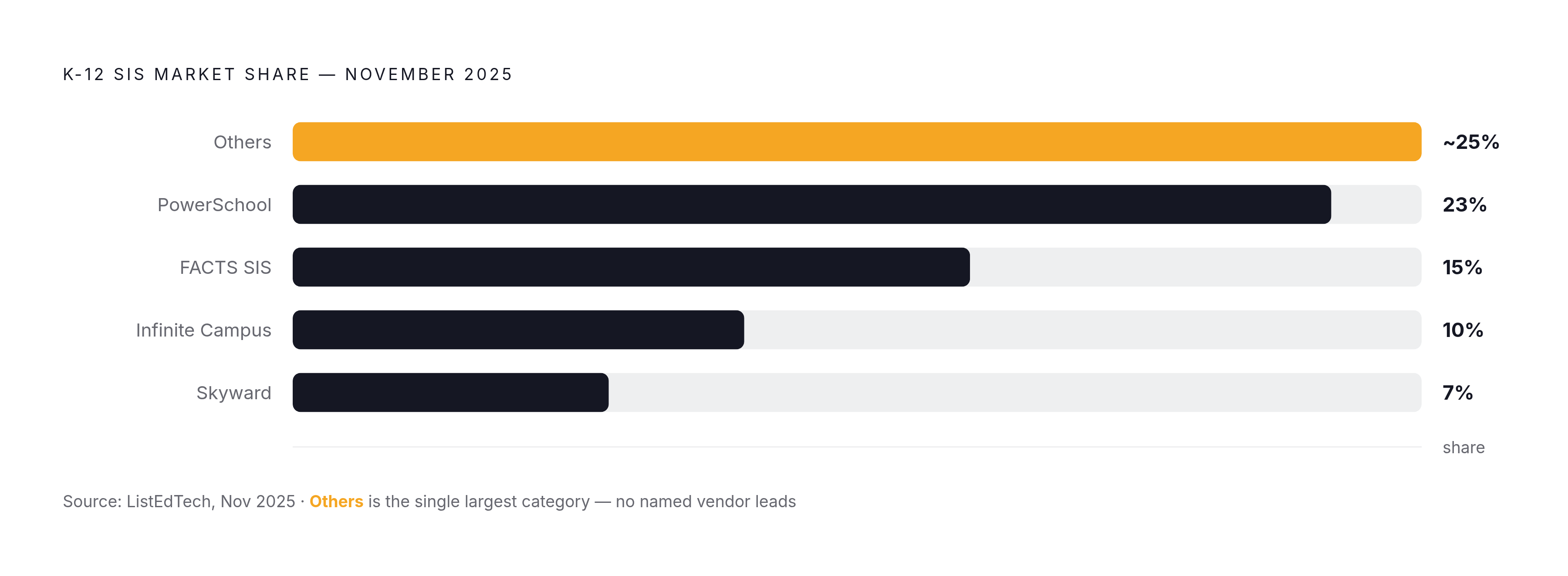
The market is more fragmented than most district buyers expect. Per ListEdTech (November 2025), PowerSchool holds 23% of identified K-12 SIS implementations, followed by FACTS SIS at 15%, Infinite Campus at 10%, and Skyward at 7%. The single largest category, however, is "Others," at roughly a quarter of all known implementations. That means a substantial share of districts are running platforms that never appear in top-line market share discussions.
PowerSchool's lead is largely acquisition-built. Since 1997, the company has absorbed more than a dozen SIS and EdTech platforms, including eSchoolPlus, Chancery SMS, Schoology, Naviance, and iNow. That history matters for districts evaluating the platform, because a system built through acquisition often carries legacy code and integration inconsistencies from products that were never designed to work together.
Pricing varies more than many buyers anticipate. Per Civic IQ contract data (April 2026), districts pay an average of $10,600 per year for PowerSchool SIS contracts, compared to $19,000 to $44,000 for comparable Infinite Campus licenses. That difference is significant when your district operates on a Title I budget.
The market itself has matured past its growth phase. New implementations peaked from 2020 to 2022, driven by emergency pandemic funding and digital-learning mandates. Per ListEdTech, the market has returned to pre-pandemic levels since 2023, which means this is now a replacement-driven market, not a first-adoption one. If you are shopping for a SIS today, you most likely already have one and are looking to switch. Cloud deployment has become the default: roughly 65% to 70% of K-12 SIS implementations run cloud-based in 2025, per the Digital Strategy Institute and Verified Market Research, as districts favor SaaS pricing and lower upfront costs over on-premise infrastructure. Other vendors active in the space, per Verified Market Research, include Skyward, Tyler Technologies, Jenzabar, Blackboard, FACTS SIS, Infinite Campus, Gradelink, RenWeb, and QuickSchools.
Where SIS Selection Goes Wrong Early
The mistake happens earlier than most people recognize, usually before a single sales call. Mark Maby, principal research director for education at Info-Tech Research Group, put it plainly in May 2026: "SIS selection becomes significantly harder when districts start evaluating vendors before defining their operational processes, requirements, and integration needs. Without that clarity upfront, districts risk choosing a platform that looks strong in a demo but creates implementation friction, adoption challenges, and long-term performance issues once it is in place."
That observation is grounded in a recurring pattern. Many districts run into trouble because of undocumented processes, disconnected applications, and unclear integration requirements. In practical terms, that means nobody recorded how attendance flows from the classroom to the state report, so nobody can tell a vendor what the new system needs to replicate.
Integration should be your first-round filter, not something worked out after a contract is signed. Per Market Growth Reports (2025), 64% of systems support plug-and-play integration with LMS, HR, and ERP tools. That figure is only useful once your district has mapped which integrations you actually need, before the contract is signed, not after.
Security deserves the same early scrutiny. Per Market Growth Reports (2025), 45% of North American and European institutions ranked data security as the top SIS purchasing factor, and outdated encryption in legacy systems creates real exposure. Data migration presents a separate and frequently underestimated challenge. Legacy systems commonly carry duplicate records, outdated entries, and inconsistent formats. You need to clean that data before vendor selection, not as a post-signature task.
ERP Rollout Sequence Determines Implementation Success
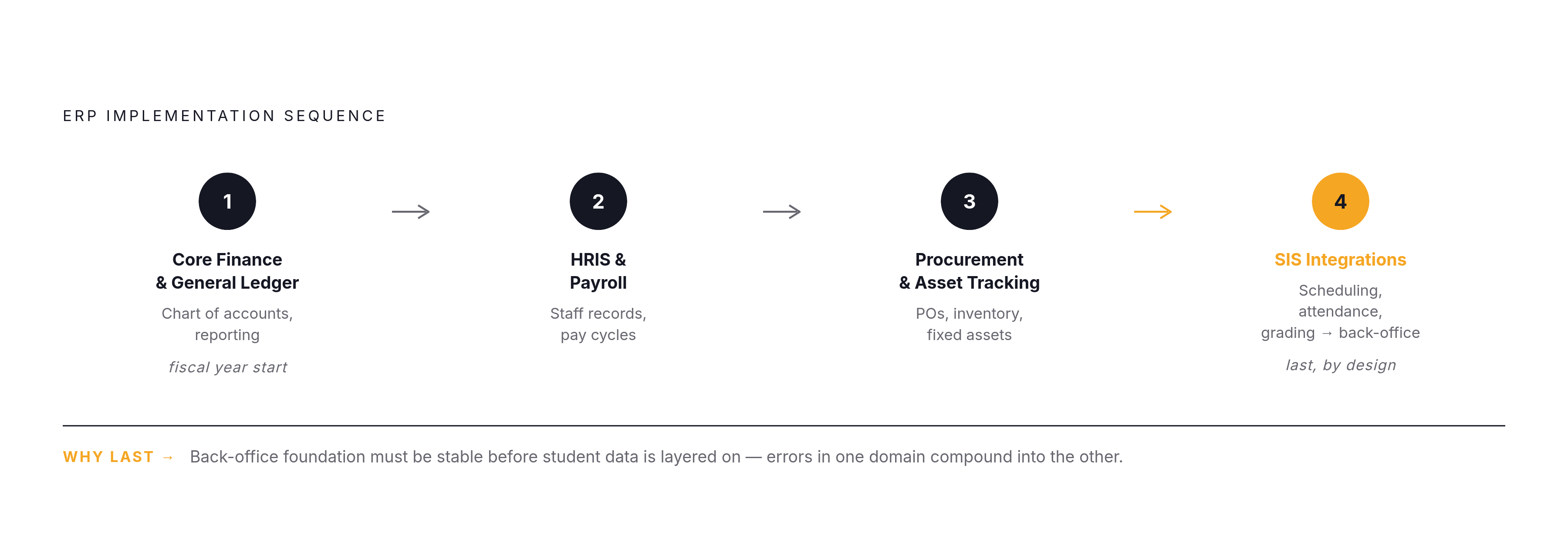
Launching every ERP module simultaneously, covering Finance, HRIS, SIS, and Procurement at once, is what practitioners call the "Big Bang" approach, and it is a well-documented path to implementation failure. Too many teams are learning new software at the same time, with too little margin to catch errors before they compound across systems.
The sequence that practitioners generally find more reliable looks like this:
Core Finance and General Ledger, launched at the start of a new fiscal year.
HRIS and Payroll Modules.
Procurement and Asset Tracking.
SIS Integrations, connecting scheduling, attendance, and grading workflows with the back-office modules already in place.
SIS integration goes last by design. The back-office foundation needs to be stable before student data workflows are layered on top. Reversing that order allows errors in one domain to compound into the other.
There is a security dimension to all of this, and it is not hypothetical. Per the Center for Internet Security, 82% of K-12 schools experienced a cyber incident between July 2023 and December 2024. The management platform sits at the entry point to student records, health data, and financial data simultaneously, which makes a breach unusually costly.
The PowerSchool breach is the case every district should study. In December 2024, a hacker accessed personal data belonging to roughly 62 million students and 9.5 million teachers, the largest breach of children's data in U.S. history. The intrusion began December 19 and was not discovered until December 28, with public disclosure to districts following on January 7, 2025. Holding 23% market share did not protect PowerSchool or the districts that depended on it. Market leadership does not reduce security risk.
Match System Type to District Size
District size drives the decision more than any feature checklist.
A small school or single campus can usually manage with a standalone SIS or a school management platform. A full ERP is difficult to justify against the implementation overhead when only a handful of staff need training and the budget being tracked is modest. A mid-sized district with real finance and HR complexity typically needs a SIS for academic records alongside targeted ERP modules for the back office, with integration between the two as the central planning challenge. A large multi-school district running tens of thousands of students or more usually needs all three working together: SIS, ERP, and school management software. At that scale, the question shifts from which system to choose to which order to deploy them and how to structure the integration architecture.
QuickSchools illustrates the smaller end of the spectrum. Per getapp.com, it is built for K-12 schools with straightforward requirements, subscription pricing sized for smaller institutions, and a fast setup process, which positions it far from the complexity of a full ERP rollout.
Before any vendor conversation begins, identify which specific workflows are failing right now. Is attendance data not reaching the state system accurately? Are activity funds going untracked? Is transportation routing breaking down when families move mid-year? Map those failures to system categories first. That makes the vendor conversation more focused and more useful.
The integration question also warrants your direct scrutiny. The 64% plug-and-play figure from Market Growth Reports (2025) sounds reassuring, but "supported" and "working in your specific environment" are two different claims. Request a live integration demo against your actual existing systems, not a review of a supported-API list in a sales presentation. Districts that navigate this process well share a recognizable pattern: processes documented before evaluation starts, data cleaned before migration begins, security questions raised in round one rather than round four, and a phased rollout plan established before anyone signs a contract.
Methodology & sources
- School Management Software 2026: Platforms & Costs
Supplied the statistic that 82% of K-12 schools experienced a cyber incident between July 2023 and December 2024, attributed to the Center for Internet Security.
- https://www.listedtech.com/blog/the-2025-k-12-sis-market/
Provided November 2025 market share data for K-12 SIS vendors including PowerSchool at 23%, FACTS SIS at 15%, Infinite Campus at 10%, and Skyward at 7%, as well as the post-pandemic market normalization trend.
- https://www.infotech.com/research/ss/select-a-student-information-system-for-k-12-education
Sourced the figures on SIS buyer priorities (over half wanting unified dashboards, 64% plug-and-play integration support, 45% ranking data security as the top purchasing factor) and the quote from principal research director Mark Maby.
- https://civiciq.com/blog/powerschool-government-contracts-k-12-sis-market-share-pricing-competitor-analysis
Provided April 2026 contract pricing data comparing PowerSchool and Infinite Campus SIS costs, and identified the December 2024 PowerSchool breach as the largest breach of children's data in U.S. history.
- https://www.prnewswire.com/news-releases/k-12-districts-risk-costly-sis-selection-missteps-without-clear-requirements-and-integration-planning-finds-info-tech-research-group-302780232.html
Sourced the May 2026 quote from Info-Tech Research Group's Mark Maby warning districts against evaluating vendors before documenting operational processes and integration needs.
- ERP Systems and QuickSchools SIS
Provided background on QuickSchools as a K-12 SIS positioned for smaller institutions with straightforward requirements and subscription pricing.
- https://empower.tylertech.com/EmpowerSchools.html
Provided reference to Tyler Technologies' School ERP product and its focus on finance, HR and payroll, procurement, and reporting for K-12 districts.