GitHub for Education Integration with LMS Developer Workflows

- Written by
- Preston Ganem
- Published
- September 13, 2026
- Reading time
- 9 min read
- Sources cited
- 8 sources ↓
What this covers
GitHub Classroom solved half a problem. Rosters synced automatically from Canvas, Moodle, Google Classroom, and other supported platforms into GitHub Classroom over LTI, so teachers didn't retype student names every semester. That part worked fine.
Grades never made the trip back. A student would submit code, auto-grading would run inside GitHub Classroom, and then a teacher had to manually key those results into whatever gradebook the school actually used for transcripts. Every semester, every class, by hand. That's the half that ate an instructor's Sunday night, and GitHub left it untouched for the tool's entire lifespan.
That wasn't an oversight, it was policy. GitHub said its philosophy was to "stick with what we're good at, which is helping people collaborate on code," and grade syncing sat outside that line on purpose. Teachers asked for it anyway, for years. It never came, and calling that a neutral tradeoff undersells how much manual work it dumped on instructors who had better things to do on a Sunday.
Blackboard made the gap worse for a huge chunk of higher ed. It's a widely used LMS platform across higher education, and GitHub Classroom never officially supported it, despite announcing it as "coming soon" at some point that never arrived. So a lot of instructors didn't even get the roster-sync half. They got no bridge at all. Just a river.
Call the whole arrangement a half bridge. It gets you partway across, then leaves you to swim.
The deprecation: what closed on August 28, 2026, and what remains
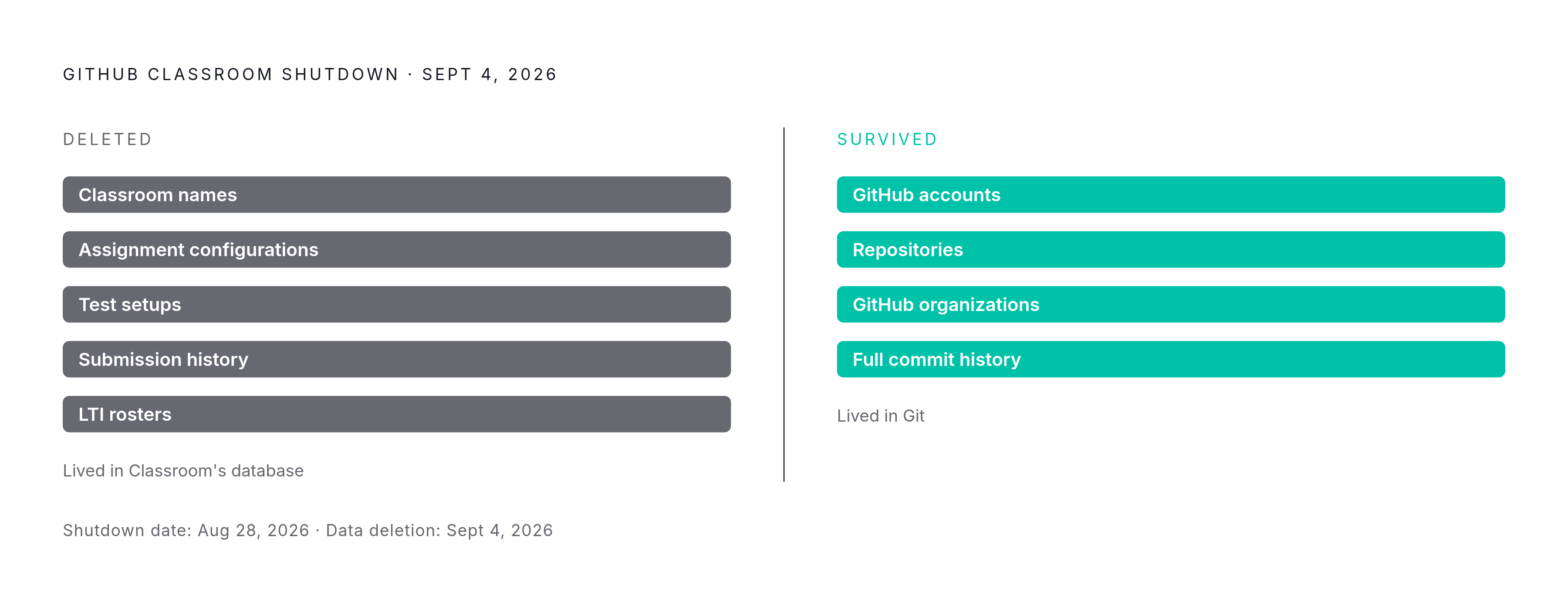
GitHub Classroom shut down on August 28, 2026. The website's gone, the APIs are gone, the backend services that ran the whole thing were decommissioned. A week later, on September 4, 2026, GitHub deleted the data that lived inside it: classroom names, assignment configurations, test setups that weren't stored in a repository, submission history, and every roster linked through the integration used to enroll students.
What survived is narrower than it sounds, but it's the part that actually matters. Student and teacher GitHub accounts are fine. Repositories are fine. Organizations built for coursework are fine. The code itself, along with its full commit history, rode out the shutdown untouched, because that data lives in Git, not in GitHub Classroom's own database.
None of this came out of nowhere. GitHub Classroom spent roughly a year and a half in what the company called "maintenance mode," meaning no real feature investment, before the deprecation was even announced. That stretch left educators stuck depending on a tool that had effectively stopped evolving. So the shutdown wasn't a surprise ending, it was the last page of a book everyone had already stopped reading.
GitHub framed the move as handing the baton to "partner solutions that can more reliably fulfill your needs." Translated: someone else was going to build the thing GitHub decided not to keep building. For instructors mid-semester when the news landed, the fallout was blunt. Rosters synced through LTI, gone. Anything not stored inside a repo, tests, grade records, config files, gone. Whatever moves forward gets rebuilt from the repos themselves, because that's all that's left standing.
The two official successors and how each handles LMS integration differently
GitHub picked two replacements. They're not competing with each other so much as serving two different classrooms that happen to share a name, and mistaking one for a drop-in replacement of the other is the fastest way to pick wrong.
Codio is the exclusive commercial partner, built to close the gap GitHub Classroom left wide open. More than 3,000 instructors and roughly half a million students who'd used GitHub Classroom were invited to migrate their courses, assignments, and grading scripts over, with free access to build curriculum before committing to anything paid.
It supports LTI integration with major LMS platforms, Blackboard included, the one system GitHub Classroom never officially connected to. Codio also adds tools GitHub Classroom simply never had: Behavior Insights, which tracks time spent, editing patterns, and paste events, and Code Playback, which reconstructs how a file changed over the course of a student's work session. That's a real shift, from grading what a student turned in to watching how they got there.
The tradeoff is real too, and it deserves to be named clearly instead of glossed over. Codio runs in the browser, so nobody needs to configure a local dev environment. Convenient, right up until you notice students may be working primarily inside Codio's own browser-based environment rather than building out a GitHub profile with visible commit history they can point to later. For a computer science program that wants to send students into interviews with a real GitHub profile, that's a genuine cost, not a rounding error.
Classroom 50 goes the other direction entirely. It's free and open-source, built by the Fifty Foundation (GitHub's official open-source partner for education tools), and it grew out of the classroom tooling behind Harvard's CS50. It ships with both a command-line interface and a web interface, supports assignment workflows built around real repositories, and auto-grades through GitHub Actions.
Its defining feature: students work in real GitHub repositories, with commit history that looks exactly like what a professional developer produces. If part of the point of the course is teaching Git itself, not just teaching a language, Classroom 50 keeps that lesson intact. What it doesn't offer is deep LMS gradebook syncing, or anything resembling Codio's behavioral tracking.
Anyone claiming one of these platforms just wins outright is selling something. The real fork is what kind of class is being taught: a managed, all-in-one environment with full LMS plumbing, or an authentic, repo-first workflow where Git fluency is itself a graded outcome. Pick based on that, not on which vendor pitched harder.
How to read the LMS integration capabilities of each successor against your actual workflow
Which platform is "better" is the wrong question. Which specific gap in the current setup actually needs closing is the right one, because the two platforms aren't solving the same problem.
Running Blackboard and need roster sync plus gradebook integration? Codio is the only option on the table, full stop. GitHub Classroom never served Blackboard, and Classroom 50 doesn't fill that hole either.
Running Canvas, Moodle, or another platform and mainly want to keep the GitHub-native way of doing things? Classroom 50 preserves that continuity, closer to what GitHub Classroom offered at the code and assignment layer.
Trying to catch AI-assisted shortcuts, or just wanting evidence of process instead of only output? Codio's telemetry, the paste events, the time-on-task tracking, the playback feature, gives visibility neither GitHub Classroom nor Classroom 50 ever had.
Some instructors will land on a hybrid: run Classroom 50 to keep the authentic repo workflow, then manually enter grades into the LMS, accepting the same gap GitHub Classroom always had. Not elegant, but workable, if the pedagogical upside of real repos matters more than saving a few hours of data entry.
The deprecation forces a rebuild no matter which path gets picked. That's actually the moment to upgrade the integration model instead of just recreating the old one under a new name. On the Codio side, LTI setup still needs an institutional IT admin to register the instance, same as it did with GitHub Classroom. This isn't a weekend project for one instructor working alone, so build in lead time.
Where GitHub Copilot now fits in the student developer workflow
Separate from all this gradebook business, GitHub Education still hands verified students free access to GitHub Copilot, over 100 developer tools, and cloud credits through the Student Developer Pack. Copilot alone runs about $100 a year at retail. Free for verified students and teachers, no catch.
Starting March 12, 2026, that free access moved under a dedicated GitHub Copilot Student plan, sitting alongside the rest of the Education benefits. Worth flagging for anyone teaching with this stuff: several premium models, including GPT-5.4 and the Claude Opus and Sonnet lineup, are no longer available for students to pick themselves under this new plan.
What's included now goes well past autocomplete, with a range of AI-assisted coding, testing, and development features built into the student plan. Students today learn to code inside an environment where an AI agent can plan a task, write the code, and test it before their coffee even gets cold. That's a fundamentally different starting point than the one GitHub Classroom was ever designed around, which is exactly why treating this as just another LMS migration misses the bigger shift underneath it.
Identity verification got faster too. An automated system now approves students with a valid school email quickly, clearing out what used to be a real friction point for adoption.
Copilot sits next to the LMS workflow, not inside it, and that distinction matters more than it sounds. It lives in a student's editor and GitHub account, has nothing to do with assignment distribution or grading, and no Copilot usage signal shows up in an LMS dashboard. It won't, because the two systems were never built to talk to each other.
What a coherent post-Classroom GitHub Education workflow actually looks like end to end
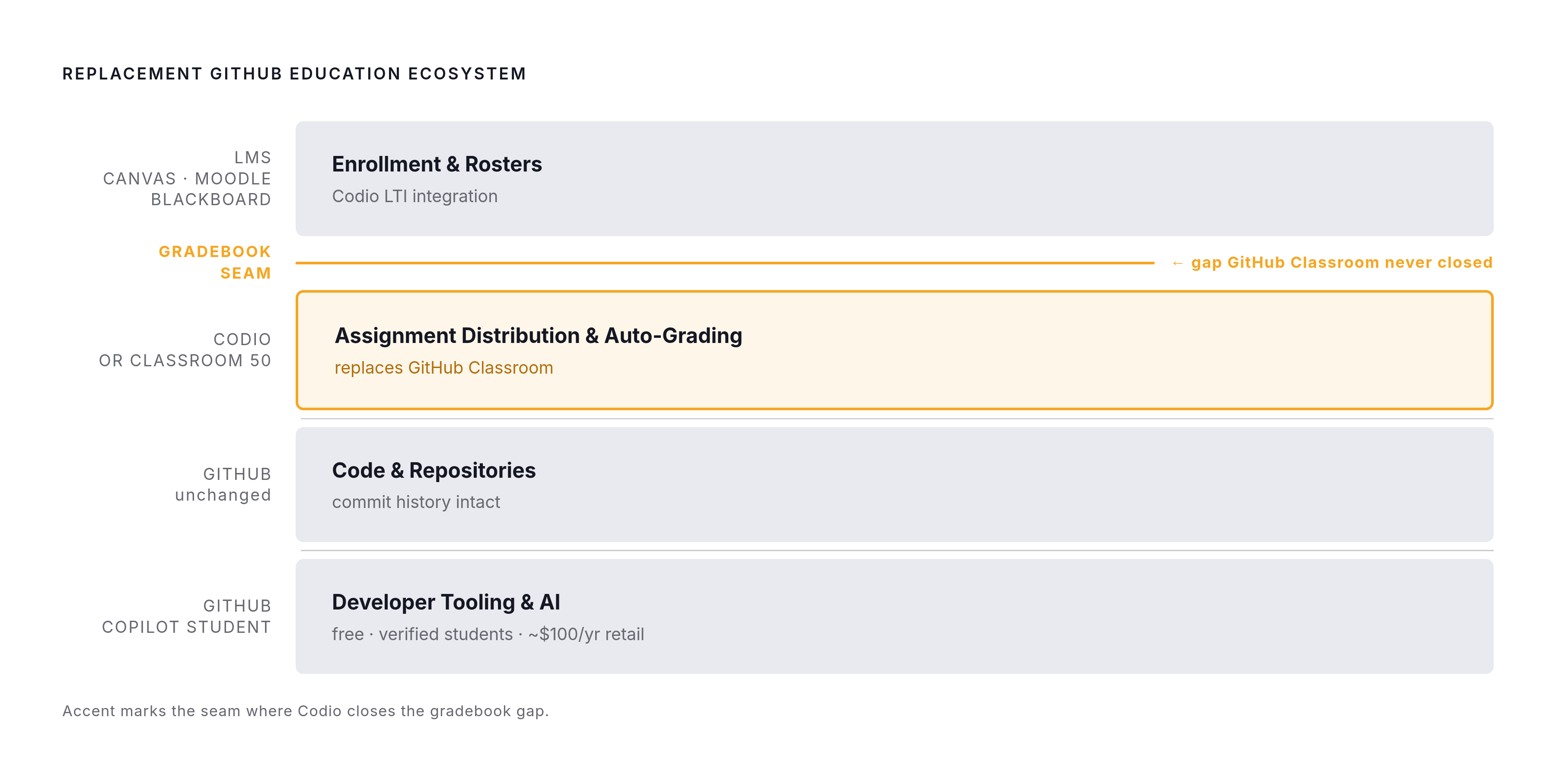
Four layers now, four different owners. Pretending otherwise is how instructors end up rebuilding the same broken bridge GitHub just tore down.
Enrollment and rosters still live in the LMS, whether that's Canvas, Moodle, Blackboard, or another supported platform. Codio's LTI integration bridges that layer into wherever assignments actually get worked on. Assignment distribution and auto-grading happen in Codio or Classroom 50, depending on which teaching model fits, since that's the exact function GitHub Classroom used to perform before it got retired. Code and repositories stay on GitHub no matter which successor platform gets picked, with version control and commit history working the same way it always has. Developer tooling and AI assistance run through the Copilot Student plan, available to any verified student regardless of which assignment platform their course happens to use.
The gradebook is still the seam where things either connect or don't, and that hasn't changed one bit since the GitHub Classroom days. Codio closes it for schools that need Blackboard or a full grade-sync pipeline. Classroom 50 doesn't offer full LMS grade passback, so instructors picking it should plan accordingly, or accept that assessment data lives outside the LMS entirely.
For any institution that needed Blackboard support, the GitHub Classroom era offered nothing. Codio is the first real option that's ever existed for that group, and that's a genuine upgrade, not a lateral move dressed up as one. It deserves to be called exactly that.
For courses where learning Git itself is part of the point, not just a means of turning in homework, Classroom 50 keeps that signal alive through visible commit history. Codio's browser-based sandbox, convenient as it is, buries that signal under a layer of abstraction, and no amount of behavioral tracking gets it back.
Here's the part that actually changes the calculus: Copilot can now assist substantially across the coding workflow, so test specifications that only check whether the output is correct stop being a reliable measure of whether a student understands anything. Process-level evidence, Codio's process-monitoring features, Classroom 50's commit trail, matters more now, not less, in a world where the IDE itself can do the assignment start to finish. Instructors who ignore that and just pick whichever tool clones GitHub Classroom most closely are solving yesterday's problem.
The real question facing instructors is what should replace the old setup. It's what the setup should even be, now that the tools students code with have changed underneath them. The workflow built to teach them has to change too, or it's just grading a different kind of homework with the same old blind spots.
Methodology & sources
- Use GitHub Classroom with Canvas, Google Classroom, or your own tools
Described GitHub Classroom's LTI-based roster sync with Canvas, Moodle, and Google Classroom, and the company's stated philosophy of sticking to code collaboration.
- https://github.blog/changelog/2026-08-27-github-classroom-deprecated/
Provided the official deprecation timeline, including the August 28, 2026 shutdown date, the September 4 data deletion, and the description of the maintenance-mode period preceding it.
- GitHub Classroom - Is there any feature to sync auto-grading results with LMS? · community · Discussion #50890
Documented instructors' longstanding requests for auto-grading results to sync back to their LMS gradebooks, a feature GitHub Classroom never provided.
- GitHub - github-education-resources/classroom: GitHub Classroom automates repository creation and access control, making it easy for teachers to distribute starter code and collect assignments on GitHub.
Described GitHub Classroom's core function of automating repository creation and access control for assignment distribution.
- Thank you for being part of the GitHub Classroom journey 🎓 · community · Discussion #205975
Explained the LTI-based connection between GitHub Classroom and supported LMS platforms for roster synchronization.
- https://www.codio.com/blog/extending-github-education
Described Codio's role as GitHub's exclusive commercial partner successor, its LTI support for Blackboard, and features like Behavior Insights and Code Playback.
- https://www.codegrade.com/blog/whats-happening-with-github-classroom-in-2026
Outlined what data was deleted after the GitHub Classroom shutdown versus what survived, and described the maintenance-mode period before deprecation.
- https://github.blog/changelog/2026-03-13-updates-to-github-copilot-for-students/
Detailed the March 12, 2026 launch of the dedicated GitHub Copilot Student plan and the changes to available AI models under it.