Schoology vs Canvas vs Google Classroom TCO for K-12 Districts
Hidden implementation and integration costs often exceed the sticker price districts see upfront.

- Written by
- Kian Nardone
- Updated
- September 21, 2026
- Reading time
- 10 min read
- Sources cited
- 5 sources ↓
What this covers
The sticker price on an LMS contract is the least important number in your decision. Once you add up licensing, setup, SIS integration, training, and what it costs to switch later, the real total cost of ownership (TCO) for Schoology, Canvas, and Google Classroom looks nothing like the quote on page one of the proposal. With ESSER money gone and school boards now asking for hard ROI on every tech dollar (per the Authencio EdTech guide), that gap between sticker price and real cost matters more in 2026 than it ever has.
The global K-12 edtech market hit roughly $39.92 billion in 2026, and the LMS piece of that pie keeps growing fast. Three platforms now run the show: Google Classroom holds 31% of the K-12 LMS market, Canvas holds 24%, and Schoology holds 19%. Adding it up, that is nearly three-quarters of the market sitting with three vendors. Moodle has fallen to 7% in 2026, and every other option combined is just 6%. Walking away from the big three carries real risk because there is not much of a market left to walk toward.
That scarcity matters if your district is trying to consolidate right now. The over-adoption of disconnected apps in the early 2020s left many teachers juggling six logins to teach one class, and many districts are responding by standardizing on a single platform. But consolidating means picking one of these three platforms and living with it, so getting the TCO math right before you sign matters considerably more than it used to. Every section below adds a layer of cost on top of the sticker price.
Canvas, built by Instructure, started life as a higher-ed LMS and moved into K-12 later. The higher-ed origins show in the assignment and rubric tools, which are sharp. SpeedGrader makes fast grading actually fast, and broad integration support opens the door to a wide catalog of outside tools. Canvas is built for districts willing to pay for a full-featured system and treat the LMS as core infrastructure.
Schoology, now owned by PowerSchool, was built for K-12 districts from day one. Its tightest advantage is native sync with PowerSchool's student information system, plus parent communication and admin reporting tools built specifically for K-12 district needs. The interface has not aged as gracefully as Canvas's, but the feature set is purpose-built for district administration.
Google Classroom is not really in the same category as the other two, and comparing it feature-for-feature to Canvas or Schoology misses the point. It is a workflow layer sitting on top of Drive, Docs, and Forms. It lacks SCORM or xAPI support, and its gradebook, assessment, and parent communication capabilities are limited compared to a full LMS. It is free, or close to it, bundled with Google Workspace for Education.
Weblogg-ed's comparison frames these decisions around use-case and workflow fit rather than pure feature lists. Choosing an LMS is really choosing an operating model: how much simplicity you need versus how much control. Treating it as a feature checklist tends to make the procurement process go sideways.
Districts are increasingly running two platforms at once. Pairing Google Classroom with Canvas or Schoology is becoming more common, which solves some problems and creates new ones, and this piece will return to that trade-off later.
Licensing: What the Contract Actually Covers
Google Classroom starts free with Google Workspace for Education Fundamentals. Paid tiers run anywhere from free up to about $4 per student per year. Nothing else in this comparison gets close to that price floor.
Canvas does not publish pricing. Every contract gets negotiated based on enrollment, contract length, and which add-ons a district selects. Buyer-reported numbers put smaller deployments (under 5,000 users) at $8 to $12 per user per year, dropping to $3 to $6 per user once a district crosses 20,000 users. In dollar terms, that is roughly $25,000 to $75,000 a year for small districts and $75,000 to $300,000 for mid-size ones. Add-ons stack on top: Canvas Studio for video, Mastery Connect for K-12 assessment, Canvas Catalog, premium support, plus the newer Core, Plus, and Next tiers that layer in AI features through IgniteAI. Districts that cite Google Classroom as a competing option during negotiations reportedly land discounts of 15% to 30% off Canvas's base pricing.
Schoology does not publish pricing either, but third-party benchmarks put Schoology Learning at $30 to $40 per user per year.
Running the numbers on a 500-student district over five years (estimates from published pricing benchmarks, with actual costs shifting based on negotiation): Google Classroom's Education Plus tier is around $15,000 to $24,000. Canvas is between $37,500 and $62,500. Schoology sits highest, at $75,000 to $100,000.
These numbers are the floor, not the ceiling. Every category that follows stacks additional cost on top.
Implementation Costs Vendors Rarely Disclose
Implementation, integration, and content migration usually cost more than the license itself in that first year, and they catch district budget committees off guard almost every time.
Canvas rollouts vary widely by scale. A mid-size district can go live in four to eight weeks with a basic setup. Enterprise-level rollouts run 12 to 18 months. Appalachian State University is running an 18-month phased transition that wraps up in Summer 2027. Drexel University started its Canvas move in Fall 2025, with a full rollout finishing in January 2027. Canvas itself recommends staffing at 0.5 to 1.0 full-time administrator for every 2,000 students, and that is not a one-time cost. It is a salary line that renews every budget cycle.
SIS integration typically runs $5,000 to $20,000. Google Classroom's tight tie-in with Google Workspace keeps IT overhead lower, but Canvas and Schoology both need real configuration work to connect to a district's student information system. Content migration adds more: Instructure and its certified partners typically start migration services at $10,000 and go up from there. Schoology's implementation and SIS setup runs $5,000 to over $100,000, with professional development adding another $1,000 to $50,000-plus depending on scope. Teacher training on Canvas specifically runs $5,000 to $25,000 for workshops and onboarding.
Published LMS pricing benchmarks show that setup fees, integration charges, premium support, and content costs can inflate initial estimates by 20% to 40%. Google Classroom's low implementation cost trades upfront expense for the hours teachers spend working around what the platform cannot do on its own.
SIS Integration: The Biggest TCO Swing Factor
Roster accuracy, grade passback, and attendance sync touch every teacher every day. A clunky manual process does not cost one person time; it costs hundreds of staff time, multiplied across a whole school year.
Schoology's bundle with PowerSchool is the clear standout here. Grade changes and roster updates sync automatically, with tight two-way integration between the LMS and the SIS. Districts already on PowerSchool benefit from the bundle, which generally beats buying the pieces separately on cost.
Canvas needs more configuration to achieve the same result. What ends up in the final contract depends on district size, how many accounts are active, and whether the deal covers teacher tools, parent access, and SIS connections to systems like PowerSchool or PeopleSoft. Integration work typically runs $5,000 to $20,000.
Google Classroom's grade passback gap is the clearest hidden cost in this comparison. Canvas and Schoology both support deeper SIS grade integration than Google Classroom does natively. Districts using Classroom either export CSV files manually or pay for automation tools like Grade Transferer. That friction adds up in a predictable way. Teachers skip syncing small formative assessment scores because the manual process is burdensome. Gaps then accumulate in data that administrators cannot see.
Canvas also leads on the broader integration front through LTI 1.3, which opens the door to hundreds of outside EdTech tools. Google Classroom does not support the LTI standard at all, so any integration has to be custom-built against Google's own APIs, which means paying developers to build what Canvas gets through an open standard.
A district running PowerSchool that switches from Schoology to Canvas might save money on licensing and then spend those savings on custom integration work. Net TCO does not automatically improve just because the invoice looks smaller.
Training and Support Costs Recur Every Year
Training is not something a district pays for once and forgets. Teacher turnover makes it a recurring line item, year after year, which is particularly costly for any platform with a steep learning curve locked into a multi-year contract.
Teachers who have used both Canvas and Schoology tend to prefer Canvas, while IT directors and principals lean toward Schoology. That split tells you whose friction you are actually paying to reduce: the classroom's or the admin office's.
Google Classroom keeps training costs low by default. Teachers already comfortable with Google Workspace pick it up quickly, and that is a genuine, ongoing cost advantage that holds until a district needs a feature the platform does not have. Canvas's premium support tiers cost extra on top of the base license, and that 0.5 to 1.0 FTE administrator ratio per 2,000 students compounds across the life of the contract. Schoology's total cost of ownership can run two to five times the license fee alone, per third-party benchmarks. That multiplier kicks in once you count implementation, training, and integration work, especially at large scale.
Adoption failure is a cost that never appears on any invoice. Breakthrough Public Schools, a roughly 3,000-student district, dropped Schoology outside of a formal procurement cycle. Teacher adoption stayed low, the training burden stayed high, and leadership eventually decided paying for a system nobody was using did not make sense. Platforms rarely get abandoned because of missing features. They get abandoned because staff never actually started using them, and that kind of failure triggers switching costs stacked on top of money already spent.
Parent engagement adds its own cost layer. Schoology has the most built-out native parent portal of the three. Canvas's Observer role for parents works but is not the most intuitive tool available. Google Classroom offers email summaries and little else, so districts relying on Classroom often end up paying for a separate parent communication tool, a cost not reflected in Classroom's advertised price.
Switching Costs and Contract Lock-In
Multi-year contracts are standard across all three platforms. Once gradebooks, rosters, and SIS connections are wired into a system, that system becomes difficult to leave.
Per the weblogg-ed comparison, switching mid-program is painful enough that most districts accept a bad choice rather than correct it. That outcome is the strongest argument for investing real time in your initial evaluation, because getting it wrong does not cost money once. It costs money for years.
Migrating content off an outgoing platform typically starts at $10,000 and climbs from there. New SIS integration on the incoming platform adds another $5,000 to $20,000. Retraining an entire staff on a new interface runs $5,000 to $25,000 at Canvas-scale workshop pricing. Districts sometimes run two systems in parallel during the transition, meaning they pay for both at once, while also absorbing a productivity dip during the switch.
Dual LMS adoption is one way districts are hedging against this risk. ListEdTech's May 2025 data shows more districts pairing Google Classroom with Canvas or Schoology rather than committing fully to one platform. That approach trades a one-time switching cost for an ongoing dual-platform overhead. It carries its own recurring expense.
Breakthrough Public Schools illustrates what happens when this math is done after the fact rather than before. Walking away from a paid platform mid-contract means paying for a system nobody is using while also scrambling to fund whatever comes next. Rigorous TCO analysis is designed to prevent exactly that scenario.
The real question you need to answer is not which platform costs the least this year. It is which platform creates the least regret five years out. That answer changes depending on whether your district already runs PowerSchool, already lives inside Google Workspace, or cares most about how fast teachers can move through their daily workflow.
Full TCO Breakdown Across All Cost Categories
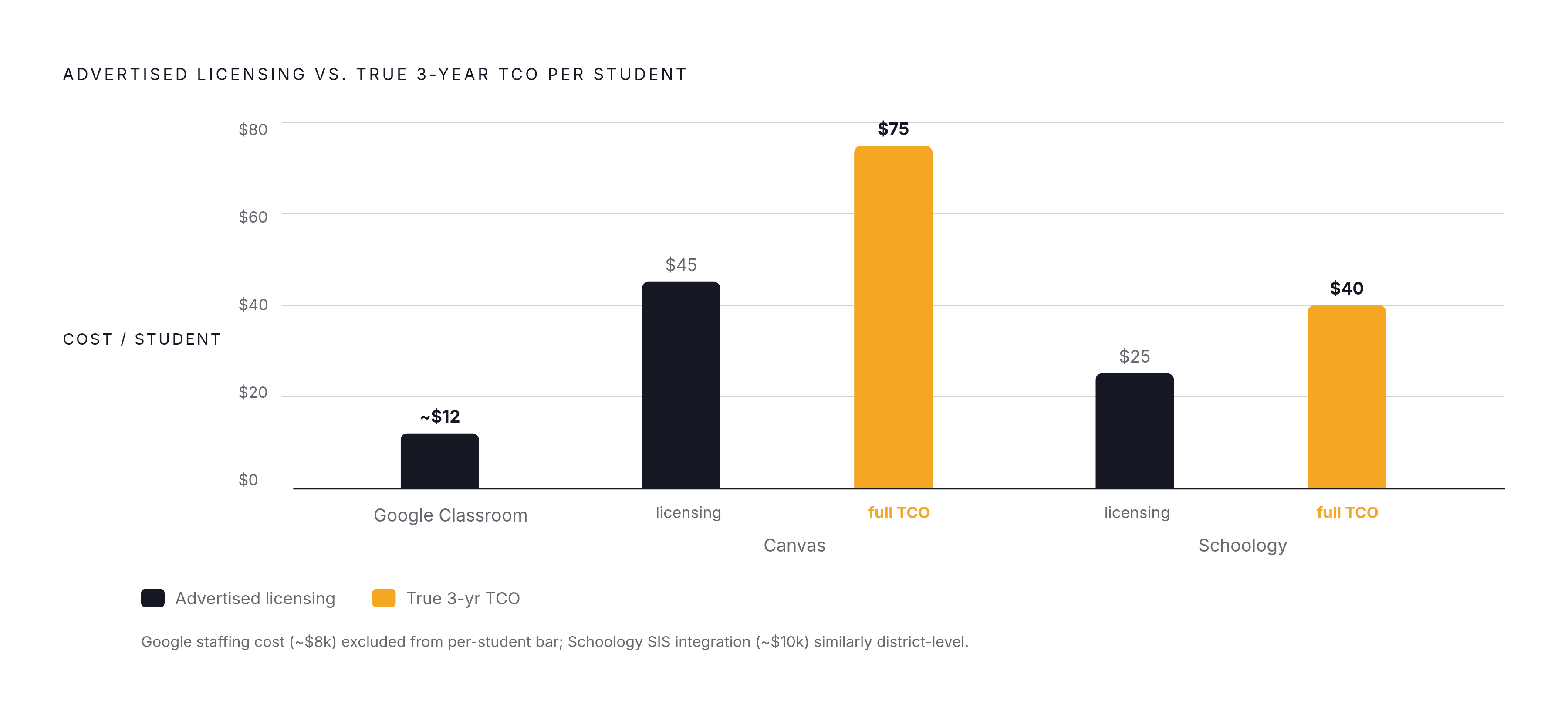
Per notion4teachers.com, a three-year per-student comparison tells a clear story. Google Classroom's Education Plus tier runs about $12 per student over three years, plus roughly $8,000 in IT staffing costs. Canvas is $45 to $75 per student once implementation fees are included. Schoology is $25 to $40 per student, plus around $10,000 typically spent on SIS integration work.
These figures are planning anchors, not guarantees. Actual costs shift with negotiation, district size, existing technology ecosystem, and which add-ons get selected.
Google Classroom wins on TCO if your district has strong existing Google Workspace adoption, light SIS integration needs, and an elementary-grade focus where a full LMS is more than you need. It also wins when teacher training cost and turnover are your dominant recurring expense, since Classroom's low learning curve keeps paying off year after year.
Canvas's higher license cost earns its keep in mid and high schools that need a full LTI ecosystem, standards-aligned grading, and the grading efficiency SpeedGrader delivers. If your district has strong instructional coaching infrastructure, you can absorb the upfront training cost and benefit from long-term workflow savings. Canvas's per-user rate also drops sharply at scale, so if your district has negotiating leverage, including the option to cite Google Classroom as a competing bid, you can reduce the base price by 15% to 30%.
Schoology's bundled model earns its cost if your district is already deep in the PowerSchool ecosystem. Native, bidirectional SIS sync eliminates the custom integration spend that both Canvas and Google Classroom require, and the stronger parent portal reduces your need for a separate communication tool. If you are already paying for PowerSchool, that bundling is the primary reason the higher per-user license fee still makes financial sense.
Methodology & sources
- Top 12 EdTech Platforms for 2026
Provided the $39.92 billion global K-12 edtech market figure and context about post-ESSER ROI pressure on districts.
- Canvas, Schoology, and Google Classroom: an honest LMS comparison - weblogg-ed
Provided the framing that LMS selection is about use-case and workflow fit rather than feature checklists, and the observation that switching mid-program is painful enough that districts accept bad choices.
- https://www.notion4teachers.com/blog/google-classroom-lms-vs-canvas-schoology-comparison
Provided the three-year per-student cost figures for all three platforms, including IT staffing costs and SIS integration estimates.
- https://www.itqlick.com/google-classroom/pricing
Provided K-12 LMS market share figures for Google Classroom, Canvas, Schoology, and Moodle, and Canvas per-user pricing ranges by district size.
- https://lmspedia.org/lms-implementation-budget-guide/
Provided the benchmark that setup fees, integration charges, and content costs can inflate initial LMS estimates by 20% to 40%.