What Is LTI and How It Works
LTI is the standard that lets any learning tool plug into any LMS without custom integrations.
Before LTI existed, the integration problem in edtech was genuinely absurd. Every LMS-to-tool connection was its own point solution. Built once, for one platform, for one tool, serving one relationship. An edtech company that wanted to support three major LMS platforms didn't build one integration. They built three. Then maintained three. Then sat through security review three times every time something changed.
Institutions weren't doing much better. Assembling a coherent learning environment meant managing a tangle of bespoke connectors. And if you switched your LMS? You rebuilt every tool relationship from scratch. I watched teams spend months on that kind of work. Months. For one platform swap.
1EdTech (then called IMS Global Learning Consortium) decided to fix this. LTI stands for Learning Tools Interoperability, and it's a data specification that defines a standard way for an LMS to launch and communicate with an external learning application. Think of it like a universal power adapter. Any compliant tool can plug into any compliant platform. No custom wiring.
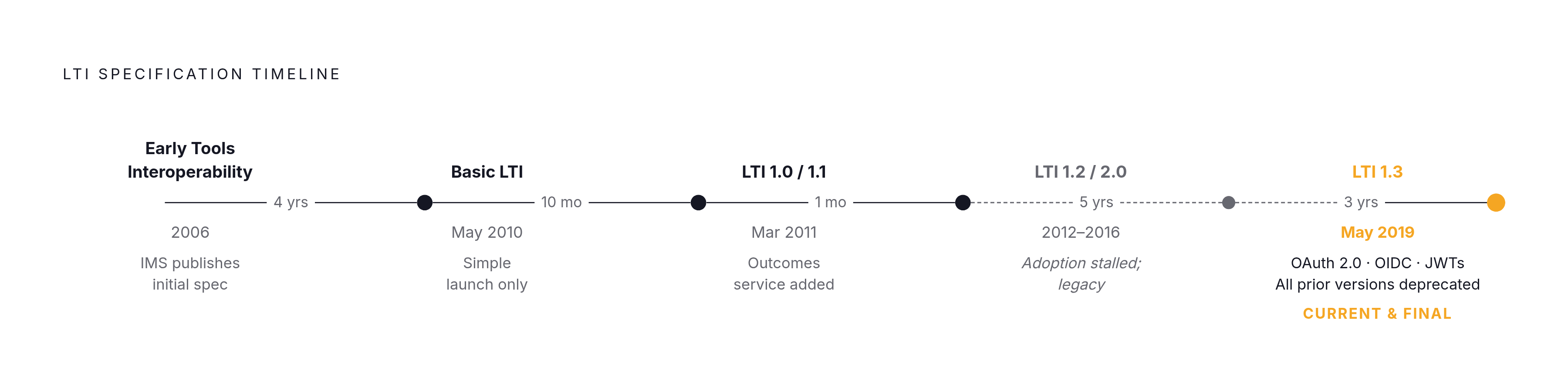
The spec didn't appear overnight:
- 2006: IMS publishes early Tools Interoperability specifications, the conceptual predecessor
- May 2010: Basic LTI releases as a simple launch mechanism
- March 2011: Basic LTI becomes LTI 1.0 and 1.1 after a basic outcomes service gets added
- May 2019: LTI 1.3 publishes, rebuilt on OAuth 2.0, OpenID Connect, and JWTs, with all prior versions deprecated simultaneously
LTI 1.3 is the current active version. 1EdTech has also said it will be the final major version. If you're making build decisions right now, that's not a footnote. That's a load-bearing fact.
The Two Roles in Every LTI Integration: Platform and Tool
Every LTI connection involves exactly two parties.
The Platform is the LMS. Canvas, Moodle, Blackboard, D2L Brightspace, Schoology. Whatever system hosts the course and kicks off the connection. Older spec language called it the "Tool Consumer," which was accurate but dry. "Platform" is the current term.
The Tool is the external application. An assessment engine, an e-book, a virtual lab, a video platform. It delivers the actual learning experience. And it's not just the application itself. It includes all the interfaces that expose that application to platforms. That distinction matters when you're building.
Trust runs both ways. The platform trusts the tool to handle user data appropriately. The tool trusts the platform's identity claims. Neither side is passively receiving. Both are actively validating. This is what makes LTI a standard rather than just a convention. Both sides implement the same spec, so any compliant platform can, in theory, talk to any compliant tool.
One side note: LTI also functions as a lightweight SSO mechanism even outside traditional LMS contexts. Some teams use it purely for that. Completely valid approach, if a bit like buying a Swiss Army knife just for the toothpick.
How an LTI Launch Actually Works, Step by Step
From a student's perspective, an LTI launch is invisible. They click a link. A tool opens. No separate login. That invisibility is the point. But there's a real sequence happening underneath.
Setup (before any user interaction):
- The tool administrator gives the LMS admin or instructor a URL, key, and secret (in LTI 1.1), or registers the tool through an OpenID Connect registration process (in LTI 1.3)
- The instructor adds the tool to a course as a resource link inside the LMS
The launch sequence (when a user clicks):
- Student or instructor clicks the tool link in the LMS
- The platform generates a signed launch message using the LTI protocol
- That message carries user identity (or an opaque identifier), the user's role, course context, and the destination
- The tool receives and validates the launch request
- The tool returns the appropriate content, rendered in an iframe or a new browser window
What actually travels in that message:
- Where the user came from (platform identity)
- Who they are (user ID, or an opaque token if privacy settings restrict it)
- Their role in the course
- Course and context metadata
Privacy controls are built into the spec. Administrators and sometimes instructors or students, depending on configuration, can control how much identifying information gets shared with any given tool. Opaque identifiers let tools track users across sessions without ever receiving personally identifiable information. In K-12 environments especially, that's not a nice-to-have. It's essential.
The whole thing, click to content, is seamless to the end user. The complexity lives entirely on the implementation side, which is where you and I spend most of our time.
How LTI 1.3 Fixed the Security Weaknesses of LTI 1.1
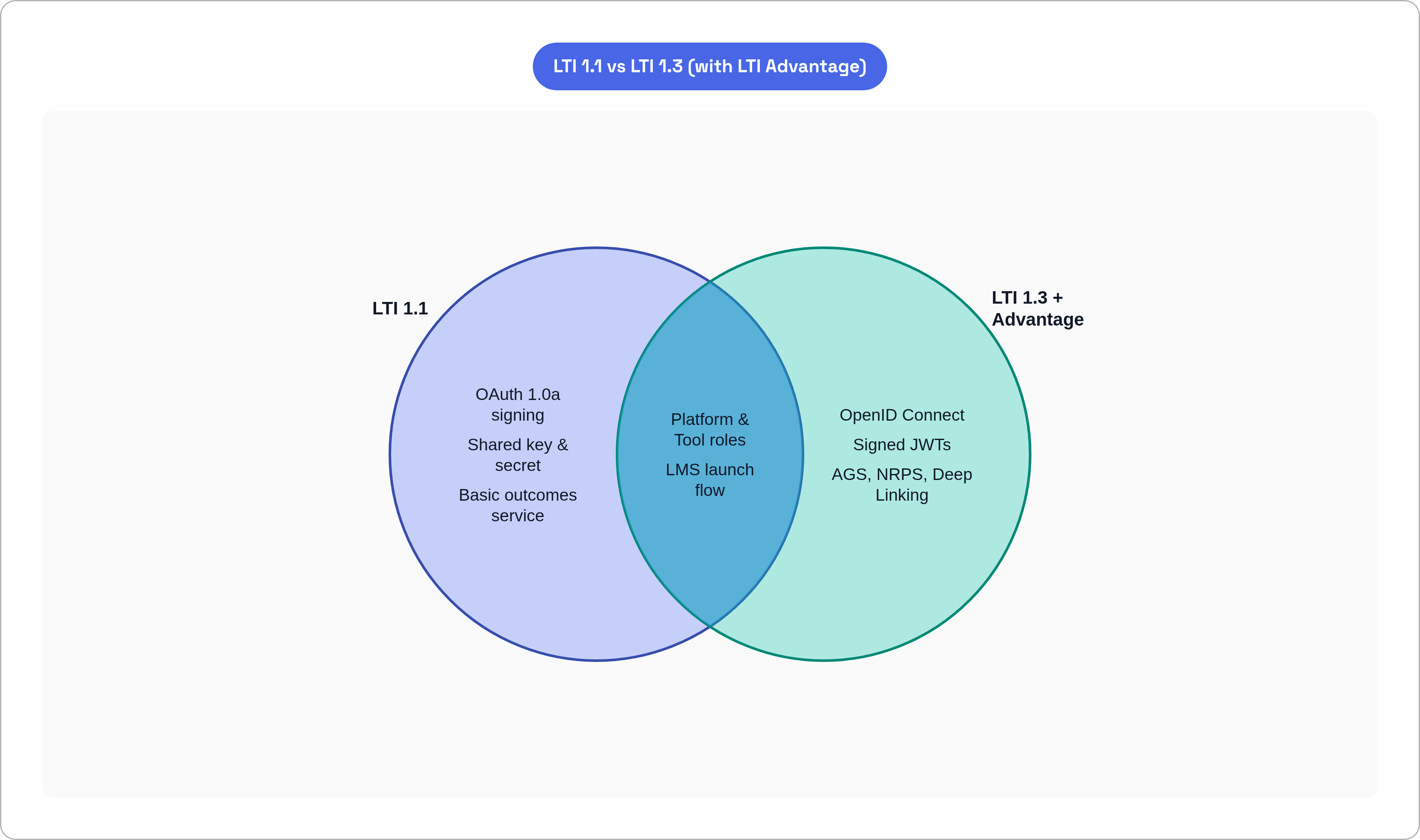
LTI 1.1 worked. For a while. In a simpler era. Its authentication model was built on a single shared key and secret between the LMS and the tool, borrowing from OAuth 1.0a signing. At small scale, manageable. At the scale edtech actually operates, thousands of tools deployed across hundreds of institutions, you end up with thousands of shared secrets distributed widely, increasingly hard to track, and nearly impossible to audit.
I don't want to be dramatic about it, but that's a practical operational nightmare. Not a hypothetical risk. The kind of thing that keeps security teams up at night and shows up in breach postmortems.
LTI 1.3 replaced the entire authentication model:
- Built on OpenID Connect, signed JWTs, and OAuth 2.0 workflows
- Each tool gets its own secure digital credential
- No shared master secret floating around
A quick detour that's actually instructive: LTI versions 1.2 and 2.0 existed between 1.1 and 1.3. Both were attempts to improve things. Both were so technically ambitious that adoption stalled almost immediately. 1EdTech eventually reclassified them as legacy and advised against migrating to them. They are a useful reminder of what happens when a spec outpaces what the ecosystem can actually absorb.
For institutions still running LTI 1.1: many tool vendors still support it for backward compatibility. But platform vendors are increasingly treating LTI 1.3 as the baseline requirement for anything that touches personally identifiable information. The migration question is when, not if. 1EdTech has certified LTI implementations across more than 250 products under the newer security framework, so the ecosystem has mostly moved on. You should too.
What LTI Advantage Adds on Top of LTI 1.3
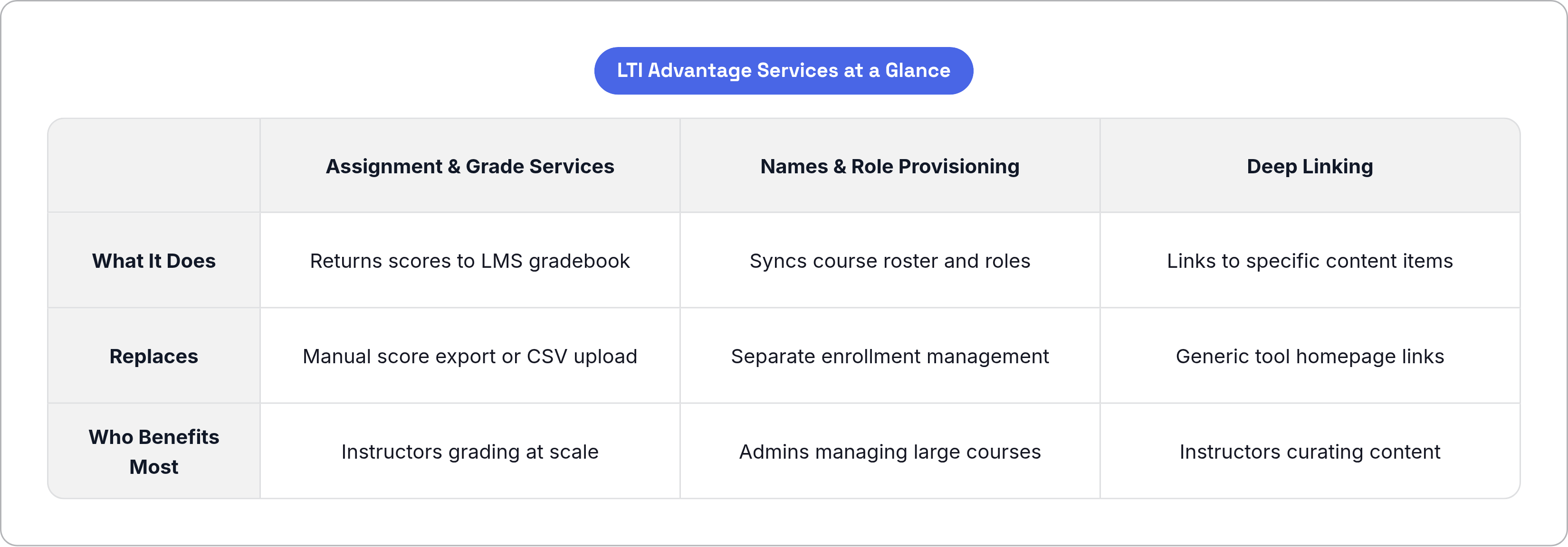
LTI 1.3 handles the launch and the authentication. That's foundational, but it leaves a lot of the actual workflow still disconnected. LTI Advantage fills that gap by bundling three optional services on top of the 1.3 core.
Assignment and Grade Services (AGS)
This replaces the basic outcomes service from LTI 1.1 and actually does the job properly. When a student completes a quiz or assignment inside the external tool, the score travels back automatically to the LMS gradebook. No manual export, no CSV uploads, no instructor copying numbers from one screen to another. If you have ever watched an instructor do that copy-paste routine for 200 students, you understand why this matters.
Names and Role Provisioning Services (NRPS)
The platform shares the course roster and role assignments with the tool. Students added to the LMS course automatically appear in the tool. No separate enrollment step, no admin syncing two lists manually. Instructors can also pull activity reports from inside the tool, which turns out to be genuinely useful for monitoring participation without logging into a separate dashboard.
Deep Linking
This one changes how content gets connected in the first place. Without Deep Linking, an instructor embeds a tool generically. A link to the tool's homepage, basically. With Deep Linking, the instructor can launch into a publisher's platform, select specific content modules, and get back resource links that point directly to those modules. Students who click the link land on exactly the right content. Not the tool's front page. Not a navigation menu. The exact chapter, exercise, or video the instructor chose.
Together, these three services turn LTI from a single sign-on bridge into something more like a bidirectional data layer. Grades flow back. Rosters sync forward. Content is precisely targeted. That's a meaningfully different product than LTI 1.1 ever was.
Where LTI Is Actually Deployed Today
LTI isn't a niche protocol. It is load-bearing infrastructure for modern education at every level.
On the platform side: Canvas, Blackboard, Moodle, D2L Brightspace, Schoology, Sakai, Open edX, and Totara all support LTI natively. That covers the vast majority of formal learning environments in operation.
On the tool side: Pearson, McGraw-Hill, Kaltura, H5P, Mentimeter, GoReact, and VoiceThread all have LTI integrations. That's a representative slice of content publishers, media platforms, and engagement tools.
For a concrete sense of scale: Instructure's LearnPlatform 2025-26 Edtech Top 40 report drew from more than 12.6 million K-12 users accessing Canvas LTI tools between September 2025 and April 2026. That's not a pilot program. That's infrastructure.
Where you see it deployed, sector by sector:
- Higher education: Unified assessments, video conferencing, group collaboration tools, all launched from a single course page without separate logins
- K-12: Gamified apps and interactive resources integrated without IT-managed credentials for each individual student
- Corporate and workforce learning: Compliance modules, simulation tools, and performance tracking systems connected to an LMS without custom integration projects
The breadth of deployment is what turns LTI compliance from a nice-to-have into a market requirement. A tool without LTI support is simply locked out of the platforms where most learners already spend their time. Not partially locked out. Out.
What LTI Means for Teams Building or Connecting Learning Tools
For edtech developers, the core value is straightforward. Implement LTI once, get compatibility with every compliant LMS. The alternative is maintaining a separate connector for Canvas, another for Moodle, another for Blackboard, and so on, in parallel, through every update cycle those platforms run. I've seen teams choose the alternative. It doesn't go well.
For institutions, LTI is what makes vendor flexibility an actual option rather than a theoretical one. Switching tools or LMS platforms doesn't require renegotiating every integration you have. That changes the leverage in procurement conversations considerably.
For instructors and learners, the mechanics are invisible. One course environment, every tool opens without a separate login, every grade returns automatically. They will never think about LTI. Good. That's exactly what a successful standard looks like.
Here's the thing nobody likes to say out loud: the compliance burden is real. LTI 1.3's authentication model, NRPS roster sync, and PII handling aren't trivial to implement correctly. The auth handshake and the data-privacy controls are where most integration effort concentrates, and where things go sideways when they go sideways. I've seen implementations that looked fine in dev fall apart in production because someone underestimated how much surface area is actually involved.
And maintenance doesn't end at launch. LMS platforms update their LTI implementations. API endpoints change. 1EdTech issues spec updates. The "build once" promise holds for the protocol layer. The operational work of keeping connectors current is ongoing. It tends to stay invisible right up until something breaks in production on a Monday morning during finals week. I say that from experience, not as a warning I read somewhere.