Integration Roadmap Planning for EdTech Startups
Building integrations in the wrong order kills EdTech deals before pilots even start.
Why the Order You Build Integrations Matters More Than You Think
Picture an EdTech startup with a genuinely great product — teachers love it in demos, a school district meeting is on the calendar — and then the IT department kills the deal because the software doesn't connect to what the district already uses. That's not a product failure. That's a planning failure, and it happens constantly.
The first question a district's IT team asks is rarely about features. It's: does your product work with the systems we already have? If the answer is unclear, many districts won't even schedule a demo. Building for this reality early is what separates EdTech startups that grow from those that stall.
What Schools Actually Need Your Product to Connect To
When we talk about "integrations" in EdTech, there are really four categories to understand — each with its own rules and its own ways of going wrong.
Learning Management Systems (LMS). This is the digital hub where teachers post assignments, students submit work, and grades live. The major ones are Canvas, Moodle, Blackboard, and Brightspace. A connection built for one won't automatically work on another. Founders who treat "LMS integration" as a single checkbox often discover mid-pilot that their product works for one institution and nobody else.
Student Information Systems (SIS) and roster data. An SIS stores official school records — who's enrolled, which teacher runs which class, what grade level everyone is in. Getting this data into your product automatically is called roster sync. In practice, this data is messy and inconsistent across districts. Different schools deliver it in different formats, and handling that variation takes real engineering effort.
Single Sign-On (SSO). Students and teachers access your product in one click from inside their LMS, no separate account needed. This sounds minor, but it isn't. If students hit a login problem in front of a class of thirty kids, many teachers will simply stop using the product. Login friction is a classroom adoption killer.
Privacy and compliance requirements. Schools are legally required to protect student data. Federal laws like FERPA and COPPA set the baseline, and many states have added stricter requirements on top. For AI-powered products — voice recognition, facial detection — 2025 federal updates added new restrictions on data collected from children. These aren't paperwork details. They shape what your product can actually do.
The Standards Your Product Needs to Speak
Schools don't expect every EdTech product built from scratch. They expect products to follow shared technical standards. Here are the ones that matter most:
LTI 1.3 is the standard that lets an external tool launch from inside an LMS and share data back — like recording a student's grade automatically in the teacher's gradebook. It works across the major LMS platforms without rebuilding everything for each one. That said, LTI handles the basics well but wasn't designed for complex workflows. Most products end up using LTI for core tasks and building direct connections for everything else. Plan for this from the start, or you'll be cobbling it together under pressure during a pilot review.
SCORM, xAPI, and cmi5 govern how learning content is packaged and tracked. SCORM is the oldest and most widely supported. xAPI can track learning activity almost anywhere — mobile, offline, simulations — but doesn't handle how content is launched. cmi5 combines both. For new content built today, cmi5 is the right default.
OneRoster and Ed-Fi handle roster data. OneRoster is the primary format US K-12 districts use to share student, teacher, and enrollment data. Ed-Fi is a broader framework used by over 10,000 schools — worth planning for in later roadmap phases if you're targeting large districts or state contracts.
Three Ways to Build Connections — and the Real Trade-offs
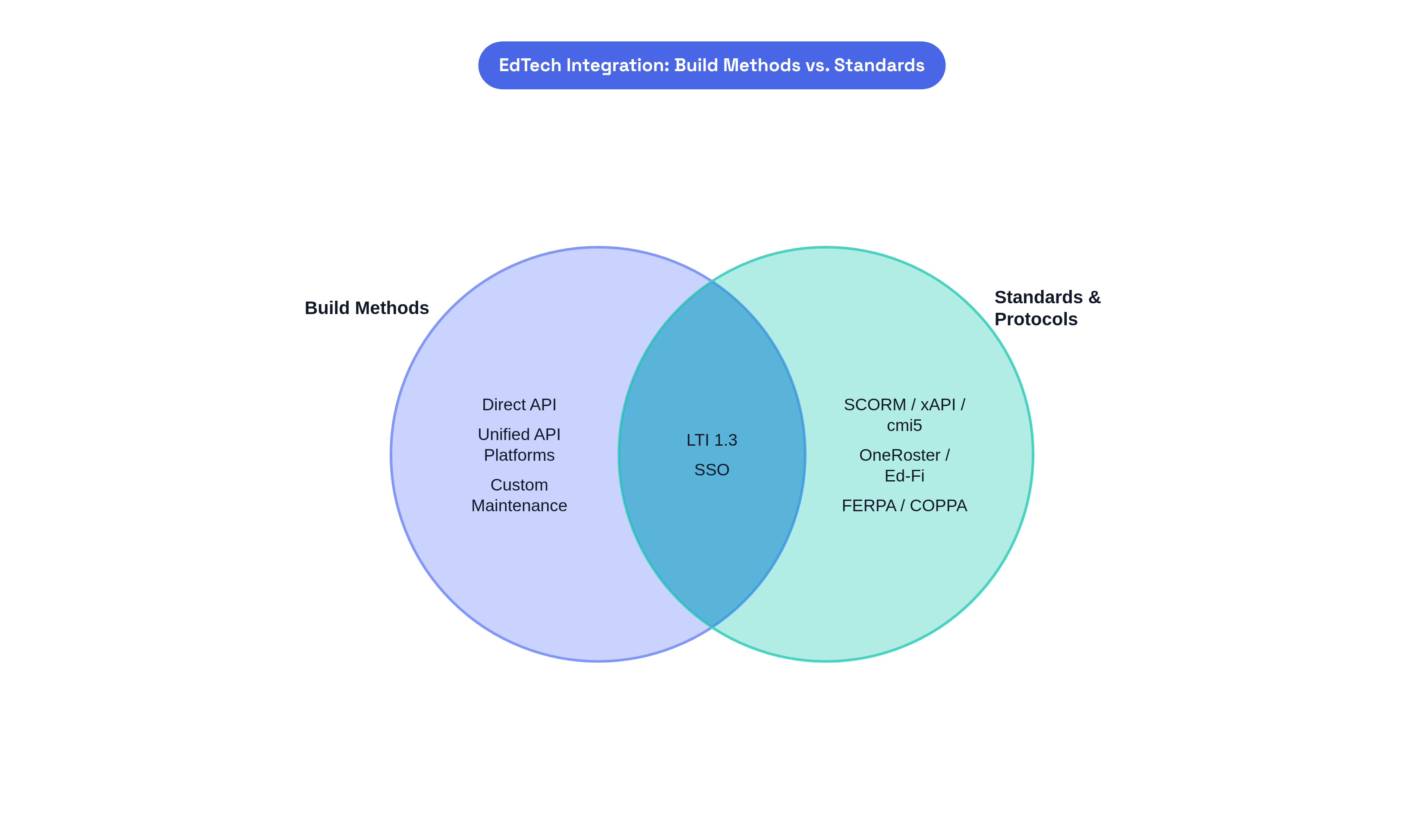
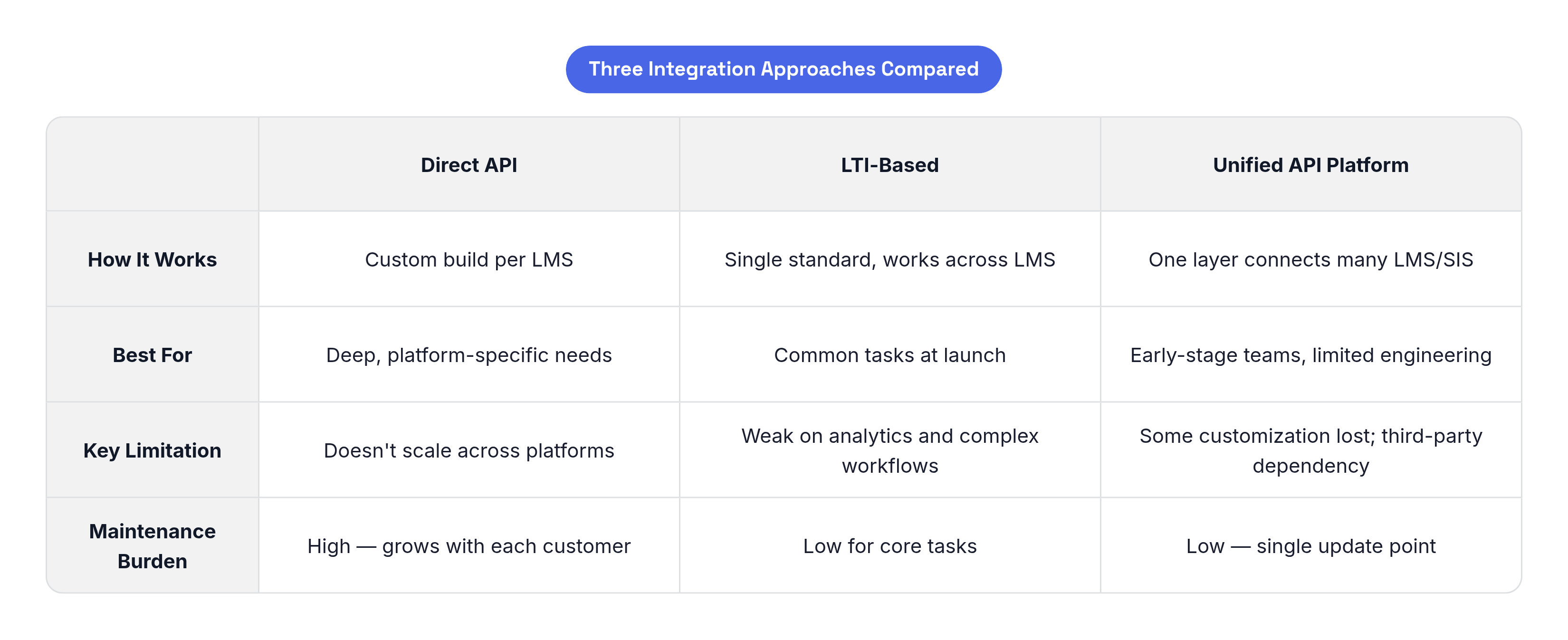
Direct API integration means building a custom connection to each LMS individually. Deep access, high flexibility, doesn't scale. Three customers on one LMS is manageable. Fifteen customers across four platforms becomes a permanent maintenance burden that crowds out actual product work.
LTI-based integration solves the "one integration that works everywhere" problem for common tasks. Right starting point for most EdTech products — but it has limits when you need detailed analytics, advanced gradebook interaction, or complex file handling.
Unified API platforms (like Edlink) give you access to many LMS and SIS connections through a single layer. Instead of updating five integrations when Canvas changes its API, you update one. You lose some customization and take on third-party dependency. For early-stage teams with limited engineering capacity, this trade-off is usually worth it. Resisting it out of engineering pride is a decision many founders later regret.
The most common mistake: starting with LTI, hitting its limits, then bolting on direct integrations with no organized structure underneath. The result is a fragile system that's hard to maintain and harder to audit. Building even basic placeholder structure for all your integrations from day one prevents expensive rewrites later.
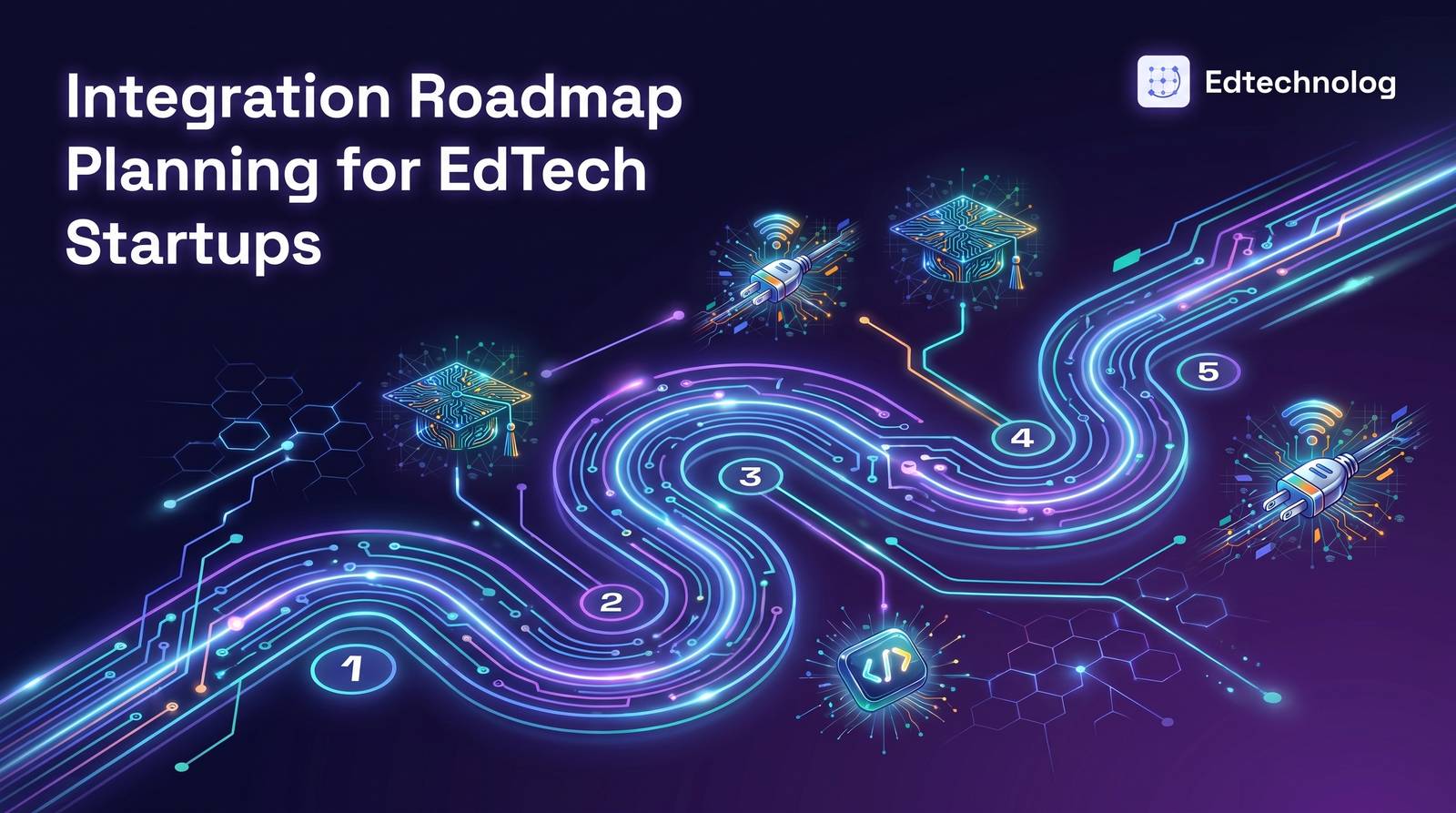
A Practical Roadmap: What to Build, When, and Why
Months 0–3: Get to Yes on the Pilot
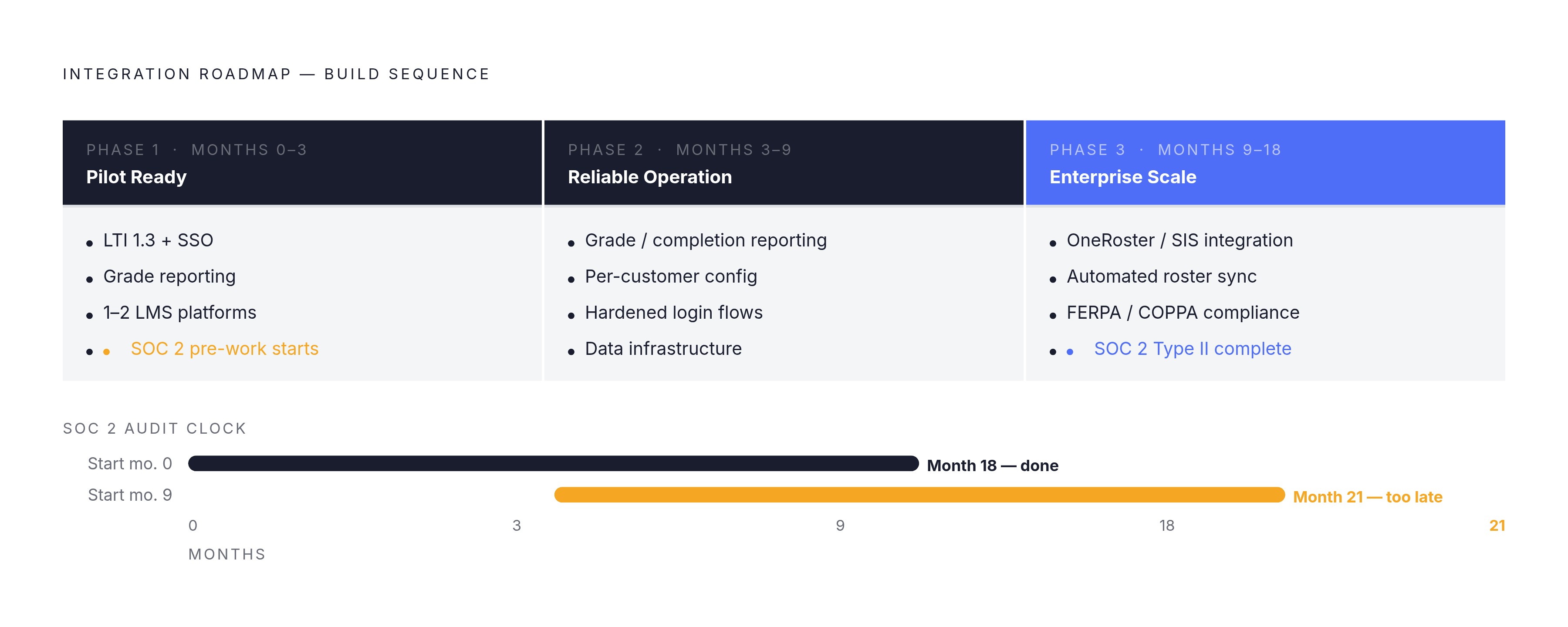
The goal is simple: give a school enough to say yes to a pilot. Build LTI 1.3 with SSO and grade reporting, tested against the one or two LMS platforms your first pilot customers actually use. Don't try to support four platforms with a small team — find out what's in scope first, then build for those.
Set up basic usage tracking now, even if it's minimal. Start the pre-work for your SOC 2 audit now too. It feels premature, but the audit requires months of documented evidence. Starting late means the report arrives too late to help with your first enterprise conversations.
Integration problems during a pilot — a broken login, grades not appearing in the gradebook, a sync failure — can kill deals that would otherwise close. A grade passback bug that takes a few hours to fix becomes a serious problem when it surfaces during a principal's walkthrough with thirty students watching. The bug isn't the issue. The timing is. Integration quality during a pilot is a sales metric, not just a technical one.
Months 3–9: Make the Product Work Reliably
Phase 2 is about earning the right to expand. Add reliable grade and completion reporting so scores land in the gradebook automatically. Build per-customer configuration. Harden your login and integration flows against situations that actually happen in schools: a student enrolled in multiple sections, a teacher copying a course from a previous semester, administrator test accounts. These aren't edge cases in theory — they're your first support tickets.
Start building your data infrastructure now. Systems set up in month four are far easier to extend than systems built under pressure in month sixteen when a district privacy officer is asking questions.
Months 9–18: Build for Enterprise Scale
This phase separates products that can close large district contracts from those that stall. Implement OneRoster or direct SIS integration so you're not manually setting up student rosters every August. Automate the processes currently done by hand.
Formal compliance reviews happen here: FERPA architecture review, COPPA assessment, SOC 2 Type II audit. If your audit clock started in months 0–3, your report will be ready when enterprise sales conversations begin. If you started in month nine, it arrives at month twenty-one — too late for many procurement timelines. There's no shortcut.
Privacy and Compliance: Built In, Not Bolted On
Compliance shapes what you can build and how. Districts often disqualify vendors based on whether the product's underlying design reflects appropriate privacy protections — not just its legal paperwork.
FERPA governs student education records. Most EdTech companies access student data under the "school official exception," which requires a legitimate educational purpose, the school retaining control of the data, and the vendor following the same confidentiality rules the school must follow. Many states have set the bar higher than federal law — California, Colorado, and New York each have additional requirements.
COPPA covers children under 13. The 2025 updates added biometric data — facial recognition templates, voiceprints, gait patterns — to the definition of personal information. For AI-powered products using voice interfaces or emotion detection in K-12 settings, this is a real architectural constraint. Raising it for the first time in a procurement meeting is disqualifying.
Accessibility is now a procurement requirement. Federal standards require EdTech products serving public K-12 districts to meet WCAG 2.1 Level AA guidelines. Retrofitting accessibility into a product not designed for it is slow and expensive. Building it in from the beginning is both the ethical choice and the smarter one commercially.
Using Integration Readiness to Win and Keep Customers
Your integration roadmap is the answer to the first question every district IT team asks. Clearly documenting which LMS platforms, SIS connections, and compliance frameworks you support — and on what timeline — gives procurement teams the evidence they need to move you forward. Vagueness signals risk, and procurement teams treat risk as a reason to say no.
The pilot phase is where you build your proof. One-click login means teachers adopt the tool without calling IT. Accurate grades in the gradebook means administrators trust the data. No privacy incidents means the district's privacy officer can recommend expanding. Every one of these outcomes is a direct result of integration quality — not feature quality.
Security certifications, privacy compliance documentation, and accessibility conformance statements should be ready before anyone asks for them. Vendors who have these prepared signal that they understand how institutions work. Vendors who scramble for them signal something else.
The list of systems you support compounds as a competitive advantage over time. A product deeply embedded in a district's daily operations isn't a discretionary tool anymore — it's infrastructure. And institutions don't rip out infrastructure casually. They also remember which vendors made getting there easy, and that matters far more in a renewal conversation than any feature comparison your sales team can put together.