SCORM Standard Explained for EdTech Developers
SCORM 1.2 remains the safe choice; SCORM 2004 adds branching but demands LMS support upfront.

Six versions of SCORM exist technically; in practice, only two matter for most developers: SCORM 1.2 and SCORM 2004.
SCORM 1.1 was the first release; too rough around the edges for wide adoption, so most LMS platforms quietly skipped it. It's context, not a build target.
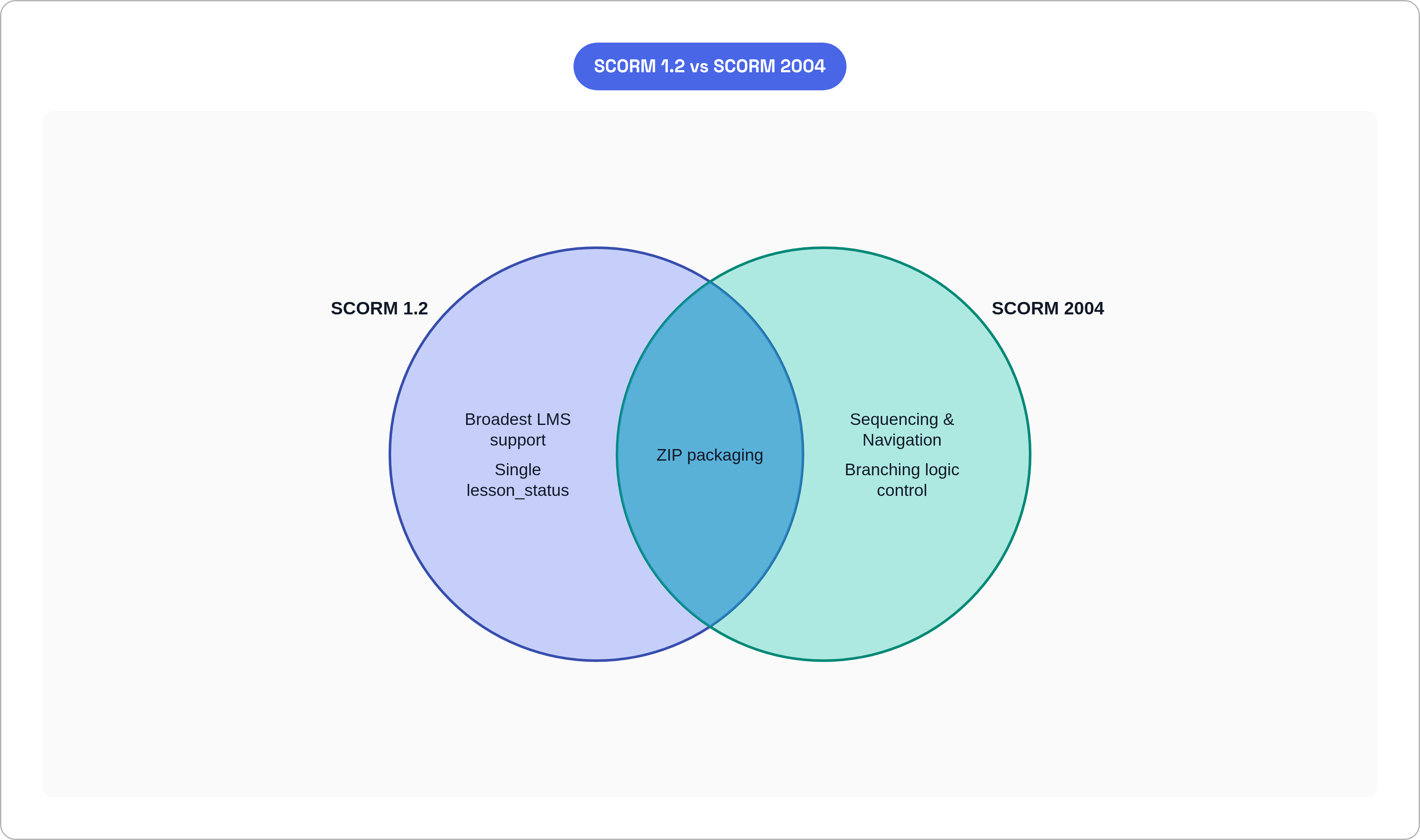
SCORM 1.2 fixed 1.1's problems and became the de facto standard. It remains the most widely supported version across LMS platforms and authoring tools today. If you don't know which version to target, start here. Seriously, just start here.
SCORM 2004 introduced Sequencing and Navigation, which gave content creators real control over branching learning paths. That's the main thing it adds over 1.2. Meaningful improvement. But adoption has been slower than you'd expect, mostly because LMS support for 2004 is inconsistent. You'll spend more time debugging environment differences than you'll spend enjoying the branching logic.
Here's the constraint that bites people at the worst possible moment: there is no forward or backward compatibility between versions. A SCORM 1.2 package will not work in an LMS configured for SCORM 2004, and vice versa. This is not a soft preference or a configuration quirk. It is a hard wall — like trying to fit a square peg into a round hole, except the peg is your entire course and the hole is your deadline. You will hit it if you fail to ask upfront which version your target LMS actually supports.
The decision isn't complicated:
- Default to SCORM 1.2 for broadest LMS compatibility and the simpler implementation path.
- Choose SCORM 2004 (3rd Edition) only if adaptive sequencing or branching logic is a genuine requirement right now, not a "maybe someday" feature.
- Most authoring tools publish to both. The real question is what your target LMS reliably supports. Ask before you build. This is the kind of thing you really do not want to discover after you've built.
How Content Packaging Works: The ZIP File as a Deployable Unit
A SCORM content package is a ZIP archive. That's it. Inside that ZIP is everything the LMS needs: HTML files, media assets, and one critically important XML file that holds the whole thing together.
That file is the imsmanifest.xml. The LMS reads it before launching anything. It does four things:
- Declares the package's content organization and structure.
- Lists every resource (file) included in the package.
- Defines the SCO (Sharable Content Object), which is the launchable unit the LMS tracks individually.
- Contains metadata the LMS uses to understand what it's working with.
The SCO is the atomic unit of SCORM tracking. One SCO is one independently launchable piece of content that communicates with the LMS via the runtime API. A single package can contain multiple SCOs. A course split into five modules has each one as its own SCO, each tracked separately.
The manifest must be well-formed and accurate. A malformed manifest is the most common reason an LMS fails to import or launch a package correctly. The LMS isn't guessing at what's inside the ZIP. It's reading the manifest. If the manifest is wrong, nothing downstream works. Nothing. The LMS just stares at you.
Before you deploy to any LMS, validate your package using a tool like SCORM Cloud. Catching a manifest error there is free; catching it in a production LMS is not free, and it is also embarrassing.
The Runtime API: How Content and LMS Talk During a Session
Once an LMS launches a SCO, the SCO needs a way to communicate back to the LMS. That communication happens through a JavaScript API that the LMS exposes in the browser window. This is the runtime layer.
How does the SCO find that API? It searches the browser window hierarchy at launch time. The object it's looking for has a specific name. In SCORM 1.2, that name is API. In SCORM 2004, it's API148411. These are different objects. They are not interchangeable. If your content is looking for the wrong one, it finds nothing, reports nothing, and tracking silently fails.
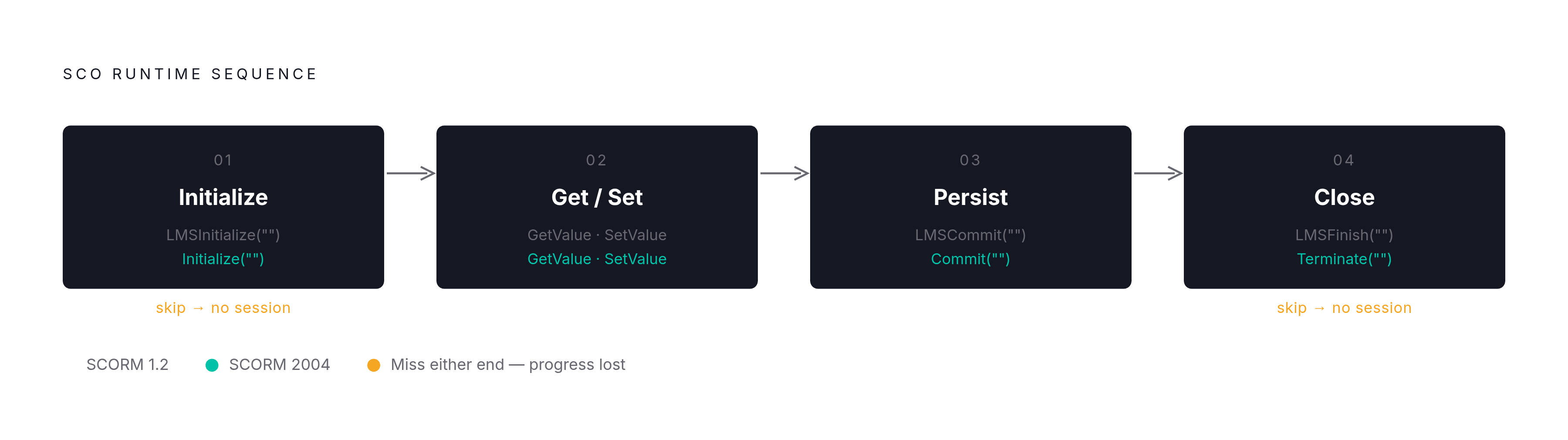
Every SCO follows the same core sequence:
- Initialize the session.
LMSInitialize("")in 1.2.Initialize("")in 2004. This tells the LMS a session has started. - Get and set data values during the session using
GetValueandSetValuecalls. - Persist data to the LMS using
LMSCommit("")orCommit(""). This saves progress. - Close the session cleanly using
LMSFinish("")orTerminate("").
Failing to call Initialize on launch, or failing to call Terminate on exit, is one of the most reliable ways to produce a SCORM tracking bug that takes you three hours to find. The LMS will not record any progress at all if the session isn't properly opened and closed. This catches people constantly, including people who have done this before.
The responsibility split matters. The LMS injects the API object into the window. The content finds it and calls it. Neither side can assume the other handles the handshake. Both sides have to do their part, and when something goes wrong, figuring out which side dropped the ball is its own adventure.
One architectural reality that explains a lot: all of this happens in the browser via JavaScript; that is a hard constraint. It's exactly why SCORM doesn't natively support offline use. There's no workaround for that within the spec. The spec is indifferent to your offline use case.
The Data Model: What SCORM Can and Cannot Track
The data model is the shared vocabulary. It's the agreed-upon set of named fields that a SCO can read from or write to the LMS. Both sides of the contract use the same field names, or the whole thing falls apart.
Key Trackable Fields in SCORM 1.2
cmi.core.lesson_status: The learner's completion and pass state. Values include "passed," "failed," "incomplete," "not attempted," "completed," and "browsed."cmi.core.score.raw: The learner's raw score.cmi.core.session_time: Time spent in the current session.cmi.suspend_data: A freeform string field, up to 4,096 characters, used to store arbitrary state so the learner can resume where they left off.cmi.studentdata.masteryscore: The passing threshold the LMS compares against the raw score.
SCORM 2004 makes one design improvement that's genuinely useful. It splits lessonstatus into two separate fields: cmi.completionstatus (completed or incomplete) and cmi.success_status (passed or failed). In 1.2, one field had to carry both pieces of information, which created real ambiguity. The split is cleaner. It's one of the things 2004 actually got right.
suspend_data is the field that will cause you the most grief if you're building anything complex. It is the only mechanism SCORM gives you to preserve arbitrary learner state between sessions. Branching paths, partially completed simulations, custom progress markers. All of that has to fit in one string field with a 4,096 character limit. For simple courses, that's fine; for anything sophisticated, you will eventually find yourself encoding and compressing state data just to squeeze it in. It's like packing for a two-week vacation using only a carry-on — technically possible, but you'll have to leave some things behind.
What the Data Model Cannot Express
SCORM's data model has structural limits that no clever implementation can fix. These aren't bugs someone failed to patch. They follow directly from how SCORM was designed.
- It can't capture granular interaction-level data beyond simple question responses.
- It can't track learning that happens outside an active LMS session, whether that's offline, in a native app, or in a simulation running outside the browser.
- It has no vocabulary for collaborative or social learning activity.
- It can't reliably capture progress from mobile use when the learner isn't in a live, connected LMS session.
These gaps exist because SCORM was designed around a browser-session, LMS-centric model. That was a perfectly reasonable design for the late 1990s; in 2025, it's a set of constraints you'll run into at some point, and it's better to know about them before you promise a client something SCORM can't deliver.
Where SCORM Actually Falls Apart for Modern EdTech Products
The offline problem is the most fundamental. SCORM requires an active browser session connected to the LMS. That's not a configuration issue. It's an architectural fact baked into the spec. There is no native offline support and no clever workaround that keeps you inside the standard.
Mobile learning is where this becomes impossible to ignore. A growing share of learners access course materials on phones. SCORM's session model does not reliably capture progress across interrupted or app-based mobile experiences. A learner who starts a module on their phone during a commute, closes the browser, and picks it up later on a desktop is asking SCORM to do something it was never built to do. Usually what happens is nothing gets saved, or the course restarts, and someone files a support ticket.
Then there's the Flash problem. A significant body of older SCORM content was built assuming Flash would always be available. It won't be. Flash is gone. If you're inheriting legacy packages, audit them for Flash dependencies before assuming they'll run on iOS or any modern browser. This is the kind of discovery that turns a "quick migration" into a months-long rebuild.
Version mismatch is quieter but persistent. No compatibility bridge exists between SCORM 1.2 and SCORM 2004. Developers who work across multiple LMS clients often end up maintaining separate published packages for each. Tedious. Unavoidable.
suspend_data size limits become a real problem for complex products. If you're building a multi-step simulation or a deeply branching scenario, you will hit the ceiling on what you can store in that one field; when you do, your options are unpleasant.
Run your packages through SCORM Cloud before any of this becomes a production problem. Catching manifest errors or API issues there is far cheaper than diagnosing them inside a live LMS while someone's waiting on you.
None of this is a reason to abandon SCORM. It's a map of the specific situations where you should ask whether SCORM alone is actually enough.
How SCORM Compares to xAPI, cmi5, and AICC
If SCORM has real limits, what are the alternatives? Here's what those choices actually look like when you have to make them.
AICC
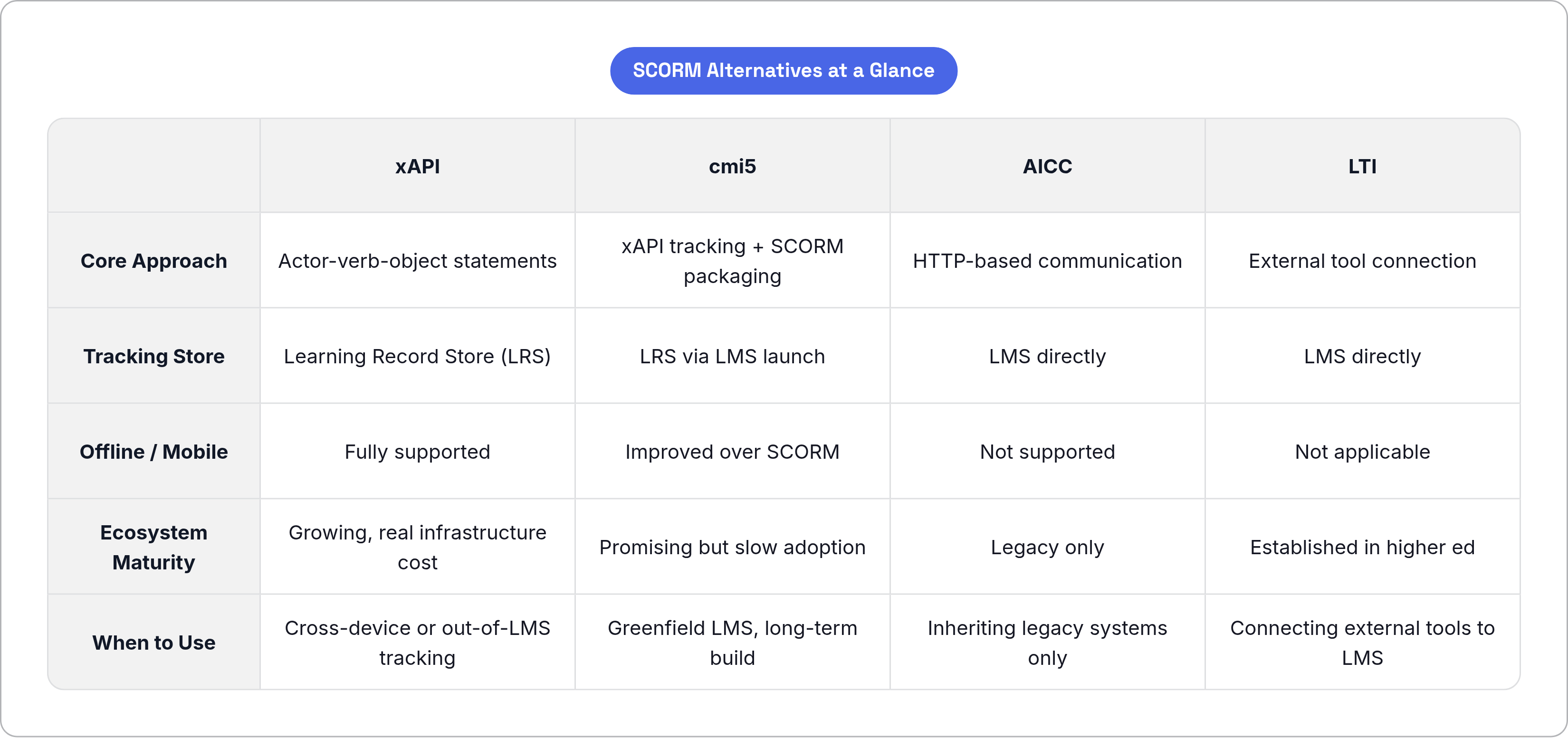
AICC predates SCORM by about a decade. Created in 1988 for aviation training. Communicates via HTTP rather than a JavaScript API. No longer maintained. The only reason to know about AICC is if you're inheriting a legacy system that uses it, in which case, you have my sympathy.
xAPI (Experience API / Tin Can)
xAPI emerged around 2013 from an ADL-sponsored effort to address SCORM's tracking limits. It takes a fundamentally different approach. Instead of a browser-session API, xAPI uses statements structured as "actor-verb-object." Something like: "User completed course 1." Those statements get sent to a Learning Record Store (an LRS), not an LMS.
The real advantage is that xAPI can capture learning wherever it happens: mobile apps, simulations, AR/VR experiences, offline activity. It's not limited to browser-launched LMS sessions.
The trade-off is real infrastructure cost. You need an LRS in addition to your LMS. That increases implementation complexity and budget. It's not a bolt-on. It's a different architecture.
Build on xAPI when rich cross-device tracking actually matters to your product today, when content lives outside a traditional LMS, or when you need to capture data from AR/VR or simulation environments.
cmi5
cmi5 tries to split the difference. It combines SCORM's content packaging model with xAPI's tracking protocol, targeting the LMS-launched course scenario that SCORM owns, but with a richer data layer underneath.
It originated from an AICC working group and landed under ADL stewardship via the xAPI community. Technically, it's the cleanest successor to SCORM for launched-course scenarios. The catch is that adoption is still slow and the ecosystem is less mature; you might build something great on cmi5 and spend a frustrating amount of time explaining to LMS vendors what cmi5 is.
LTI (Learning Tools Interoperability)
LTI solves a different problem. It connects external tools into an LMS. It's not tracking learning content the way SCORM does. Think of LTI as complementary to SCORM rather than competitive with it.
The Actual Decision
- Stick with SCORM 1.2 when your target LMS is known, basic completion and score tracking is sufficient, and budget or timeline is constrained.
- Move to xAPI when mobile, offline, or out-of-LMS tracking is a real requirement right now, not a future nice-to-have.
- Watch cmi5 if you're building a greenfield LMS-based product and you're willing to accept slower ecosystem maturity in exchange for a cleaner long-term architecture.
Real-world systems increasingly need to handle more than one standard at once. The question isn't always which standard to pick. It's often which standards you'll need to support at the same time.
How SCORM Packages Are Built and What Developers Actually Produce
Before authoring tools existed, building a SCORM package was a genuine engineering task. Developers hand-coded the manifest, wrote JavaScript API binding code, and manually assembled the ZIP. Plenty of places for things to go wrong, and they usually did.
Modern authoring tools (Articulate Storyline, Adobe Captivate, Lectora, and others) abstract all of that. You build content inside the tool and publish directly to a SCORM 1.2 or 2004 package. The tool handles the heavy lifting.
What the published package actually contains:
imsmanifest.xml, generated by the tool.- HTML and JavaScript files for each SCO.
- All media assets: images, audio, video.
- The tool's own SCORM runtime JavaScript library, which handles API discovery and all the
Initialize/Terminate/SetValuecalls.
That last item is what makes the whole thing work. The authoring tool's library is doing the runtime communication on behalf of the content. Developers building custom content outside an authoring tool have to implement that piece themselves, either by writing API wrapper code from scratch or by integrating an open-source SCORM API wrapper library. Both paths require you to actually understand the runtime layer, not just assume the tool handles it.
The custom development path:
- Write or integrate a SCORM API wrapper.
- Hand-author or generate the
imsmanifest.xml. - Assemble the ZIP correctly.
- Test against the spec using SCORM Cloud before delivering to any LMS.
The ZIP is your deployment artifact; it's what gets uploaded to an LMS. The LMS reads the manifest, registers the SCOs, and handles launch from that point. Everything you ship lives inside that ZIP. If something's wrong in the ZIP, something's wrong in production.
What SCORM's Continued Dominance Means for EdTech Developers Today
SCORM is not a legacy curiosity gathering dust somewhere. Institutional demand, including a U.S. Department of Defense mandate that all learning content be delivered via SCORM, xAPI, or cmi5, keeps the standard firmly embedded in real production environments. The market didn't move on just because newer standards arrived.
The practical consequence for developers is this: understanding SCORM's contract, the packaging layer, the runtime API, and the data model, is table stakes for any EdTech work that touches an LMS. This is true whether you're building content from scratch, integrating an LMS, or inheriting someone else's package that inexplicably won't launch and left no documentation behind.
Newer standards like xAPI and cmi5 are real and worth learning. They solve problems that SCORM genuinely cannot. But they don't replace SCORM in most production environments. They sit alongside it, which means you'll often need to understand all of them at once.
Most organizations start with SCORM because it's the path of least resistance for proven interoperability and broad LMS support. Then, as tracking requirements grow more complex or content moves beyond the browser, they layer in xAPI or cmi5. Understanding SCORM well is what allows you to make that transition deliberately, rather than discovering its limits at the exact moment you can least afford to.