Unified K-12 API Gateways for PowerSchool Infinite Campus and Google Classroom
Districts can sync rosters and grades across their major platforms using unified API standards.

- Written by
- Lorena Mercer
- Updated
- September 18, 2026
- Reading time
- 10 min read
- Sources cited
- 8 sources ↓
What this covers
Somewhere between 100 and 300 edtech tools run inside a typical district right now, and the big districts push past 500. Every one of those tools needs to know who's enrolled in what class, taught by which teacher, on what schedule. That's the whole problem: how PowerSchool, Infinite Campus, and Google Classroom talk to each other, and what breaks when they don't.
For years, each vendor solved this on its own. One would ask for a OneRoster CSV dropped into an SFTP folder. Another wanted a custom SIS feed built just for them. A third invented its own metadata fields because the standard didn't cover what it needed. Multiply that by 200 vendors and you get roster mismatches, teachers uploading spreadsheets by hand at 7am, IT staff answering the same ticket every September, and data that's already stale by the time a teacher opens the gradebook.
Student information systems like PowerSchool and Infinite Campus were built to be systems of record, the vault where enrollment and grades live permanently. Learning platforms like Google Classroom were built to be instructional tools, where assignments happen day to day. Nobody designed either one to hand clean data to the other. The fragmentation is structural, and a small handful of major SIS platforms, plus the one classroom tool nearly everyone uses, sit at the center of it. Once you understand how those pieces connect, or don't, you understand most of the integration problem districts deal with.
What Each Platform Actually Owns
PowerSchool SIS holds the official student record: enrollment, scheduling, grade reporting, and family access. Infinite Campus does the same job, covering enrollment, scheduling, attendance, and grades, though turning on its Google Classroom integration requires the Campus Learning License. That license is a separate line item a district has to purchase, not something bundled with the base product, and it creates more friction for IT teams than the actual technical setup ever does.
Google Classroom holds none of that authoritative data. It's where assignments get created, turned in, and graded. Its SIS connections run through OneRoster and are limited to named partners: PowerSchool, Infinite Campus, Skyward SMS, Skyward Qmlativ, and Follett Aspen, with gradebook sync supported across all named partners.
PowerSchool and Infinite Campus hold the truth. Google Classroom holds the workflow. Any integration connecting them has to respect that hierarchy: roster changes flow from the SIS out to Classroom, never the other way. Allowing Classroom to write back to the SIS produces conflicting enrollment records between two systems that both believe they are authoritative.
How the PowerSchool-Classroom Integration Works
As of July 2024, teachers using Google Classroom can export grades straight into PowerTeacher Pro Gradebook and pull rosters, co-teachers, and grading categories in from PowerSchool. Setup requires an admin to go to classroom.google.com/admin, select PowerSchool, click Connect to Google, and enter OAuth credentials under SIS Setup.
A few prerequisites apply. The Google Universal Rostering plugin must be installed in PowerSchool SIS. Google recommends running PowerSchool version 24.5.1.0 or later. And the district needs a PowerSchool Universal Rostering Connector with read or write access enabled.
Roster sync flows one direction only, from PowerSchool to Classroom, which keeps PowerSchool as the single source of truth. Districts can run that sync hourly, daily, or on a custom schedule, though most use nightly runs so data is fresh each morning without placing continuous load on the servers.
Grade export requires either a Google Workspace for Education Plus license or the Teaching and Learning Upgrade. It does not work on the free tier. That licensing requirement took effect July 9, 2024, and it is worth confirming before promising a teacher a capability the district has not paid for.
Infinite Campus: Where the Licensing Friction Sits
Infinite Campus follows a similar setup process, but the prerequisite is more explicit. Districts need the Campus Learning License to enable Google Classroom integration at all, and it is not included in base Campus. Infinite Campus offers a 45-day provisional license for evaluation before committing to a purchase.
The setup path runs through the system administrator page: Digital Learning Applications, Add Application, Google Classroom, then Generate New OneRoster Connection, selecting OneRoster 1.2 specifically. That generates a consumer key, consumer secret, and a OneRoster Base URL, all entered back into classroom.google.com/admin.
The connection itself uses the same OneRoster 1.2 standard Google uses for every SIS partner on its list, which means the real barrier is contractual rather than technical. Edtech vendors selling into Infinite Campus districts should build that assumption into the sales cycle from the start, because deals frequently stall waiting on a procurement decision that has nothing to do with the integration code.
Blackbaud provides a useful comparison. Its Google Classroom integration, announced September 4, 2025, runs on the same OneRoster mechanism, letting teachers export grades to Blackbaud Gradebook and pull in rosters, co-teachers, grading periods, and categories. Blackbaud holds certifications for both OneRoster 1.1 and LTI 1.3 Advantage. Any SIS willing to go through certification can pursue the same path.
OneRoster 1.2 and Ed-Fi Explained
OneRoster 1.2, maintained by 1EdTech (formerly IMS Global), handles the exchange of people, courses, enrollments, and grades between K-12 systems. It is the default rostering language now, used by roughly 70% of LMS vendors.
The most consequential change in version 1.2 was splitting Gradebook into its own formal service, separate from Rostering. That clarified grade passback as a first-class capability. Previously, grade passback required separate integration work layered on top of rostering. A product that supports OneRoster 1.2 gradebook passback now covers ground that once demanded more complex cross-standard handling.
Ed-Fi 5.x plays a different role. It is the broader K-12 data standard, covering longitudinal records and state reporting, the complete data set a state education agency needs, not just rostering. The two standards are converging deliberately: the Ed-Fi Alliance and 1EdTech have been working to bring OneRoster 1.2 capability directly into the Ed-Fi ODS/API. The bridge is the Ed-Fi OneRoster Service, which serves a standards-compliant OneRoster 1.2 feed pulled from data already stored in an Ed-Fi ODS. That service shipped in May 2026, following field testing in early 2026.
LTI 1.3 and LTI Advantage govern how tools plug into an LMS. The Names and Role Provisioning Service enables roster access as part of the tool launch flow, which is useful when a vendor wants launch and roster access handled together instead of through separate integrations.
A modern district RFP commonly asks for OneRoster 1.2 rostering with gradebook passback, LTI Advantage for single sign-on and launch, Clever sync, and Ed-Fi reporting up to the state longitudinal data system. Missing any of those typically ends the conversation.
What API Gateways Do That Native Integrations Don't
Native integrations solve exactly one platform pairing at a time. That works if a district runs a single SIS, but it breaks down quickly for a vendor selling into districts running different systems, or a district that inherited multiple SIS platforms through a merger or boundary change.
A gateway changes that model. Instead of one connection per platform pair, a vendor builds once against the gateway, and the gateway translates that single connection into whatever each SIS or LMS actually requires underneath. It normalizes authentication flows, data models where a user ID in one system is called a person ID in another, sync timing, and error handling, covering the inconsistencies that would otherwise need custom handling per platform.
Building a separate data pipeline for every SIS partnership does not scale. Each new SIS relationship becomes its own engineering project with its own bugs, its own quirks, and its own maintenance burden. Real-time sync built on webhooks costs roughly two to three times more to build than a nightly batch job over CSV or SFTP, but it eliminates the roster-drift complaints that come from waiting a day for a schedule change to appear. That tradeoff exists whether a team builds in-house or through a gateway; it does not disappear, it just changes who is responsible for it.
Even with a gateway in place, budget 4 to 8 weeks for integration QA. Most failures trace back to messy data sitting in the SIS itself rather than bugs in the integration code, so a gateway reduces that QA burden without eliminating it entirely.
Clever, ClassLink, and Edlink Compared
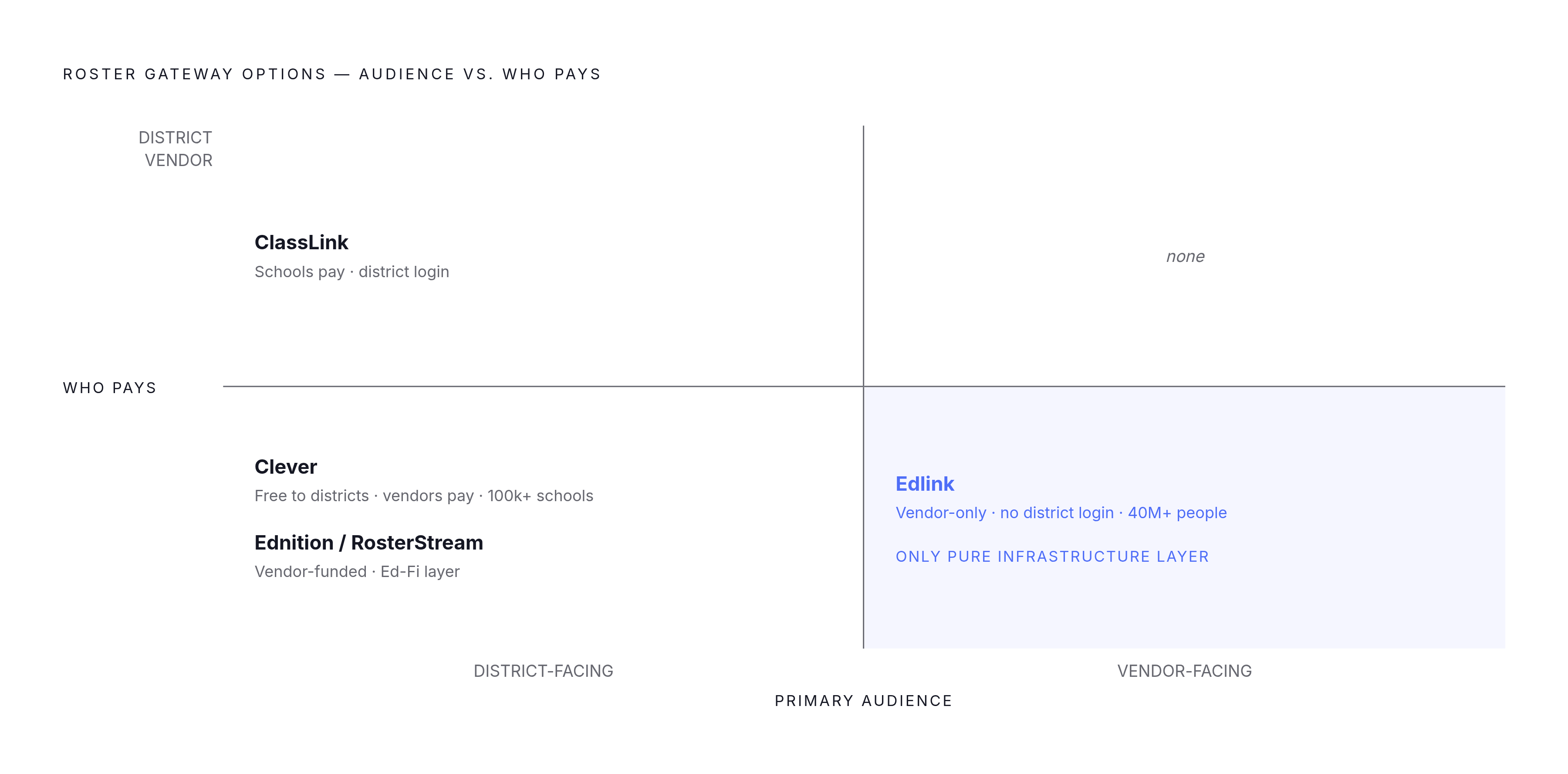
Clever connects a district's SIS data to its edtech applications, handling single sign-on and automatic roster syncing. It is used by over 100,000 schools and integrates with roughly 90% of major edtech platforms. The business model is free for districts on core SSO and rostering, while edtech vendors pay per school for paid tiers covering rostering and LMS Connect; SSO and Clever Library integrations remain free for vendors. Clever LMS Connect, which launched in December 2025, extends that reach into assignment sync and grade passback, and it is built in part on Edlink's Unified API. A school's IT admin initiates the LMS connection from the Clever dashboard, and edtech apps then push assignments and grades directly into the district's LMS.
ClassLink covers similar ground through Launchpad, OneSync, and Roster Server, all built on OneRoster. Its business model runs in the opposite direction from Clever's: schools pay for the platform while integrations remain free for vendors. The choice districts face is straightforward. Clever means a free platform and faster rollout. ClassLink means paying for the platform in exchange for more control on the district side. Districts without a compelling reason to pay typically default to Clever.
Edlink is vendor-facing infrastructure that districts never interact with directly. It is a Unified API through which vendors integrate once and reach multiple LMS and SIS platforms through that single connection. It supports over 145 edtech companies, reaches more than 40 million people, and runs inside over 4,000 educational institutions. Its purpose is abstracting away the inconsistencies between platforms through one consistent API. The arrangement behind Clever LMS Connect, launched in December 2025 and built partly on Edlink's Unified API, turned what looked like competing products into complementary infrastructure for LMS sync.
Ednition (RosterStream) approaches the problem from a different angle. A single integration with its SSO Connect service covers Microsoft, Google, Clever, ClassLink, OpenId, LTI, LDAP, and SAML together. Its Extended Data offering runs on the Ed-Fi Unifying Data Model, which matters for vendors who need Ed-Fi reporting layered on top of standard rostering.
Across all four, the split is consistent: Clever and ClassLink are district-facing identity and SSO platforms that include rostering. Edlink is vendor-facing infrastructure. Ednition/RosterStream focuses specifically on the Ed-Fi reporting layer.
Implementation Decisions That Determine Production Success
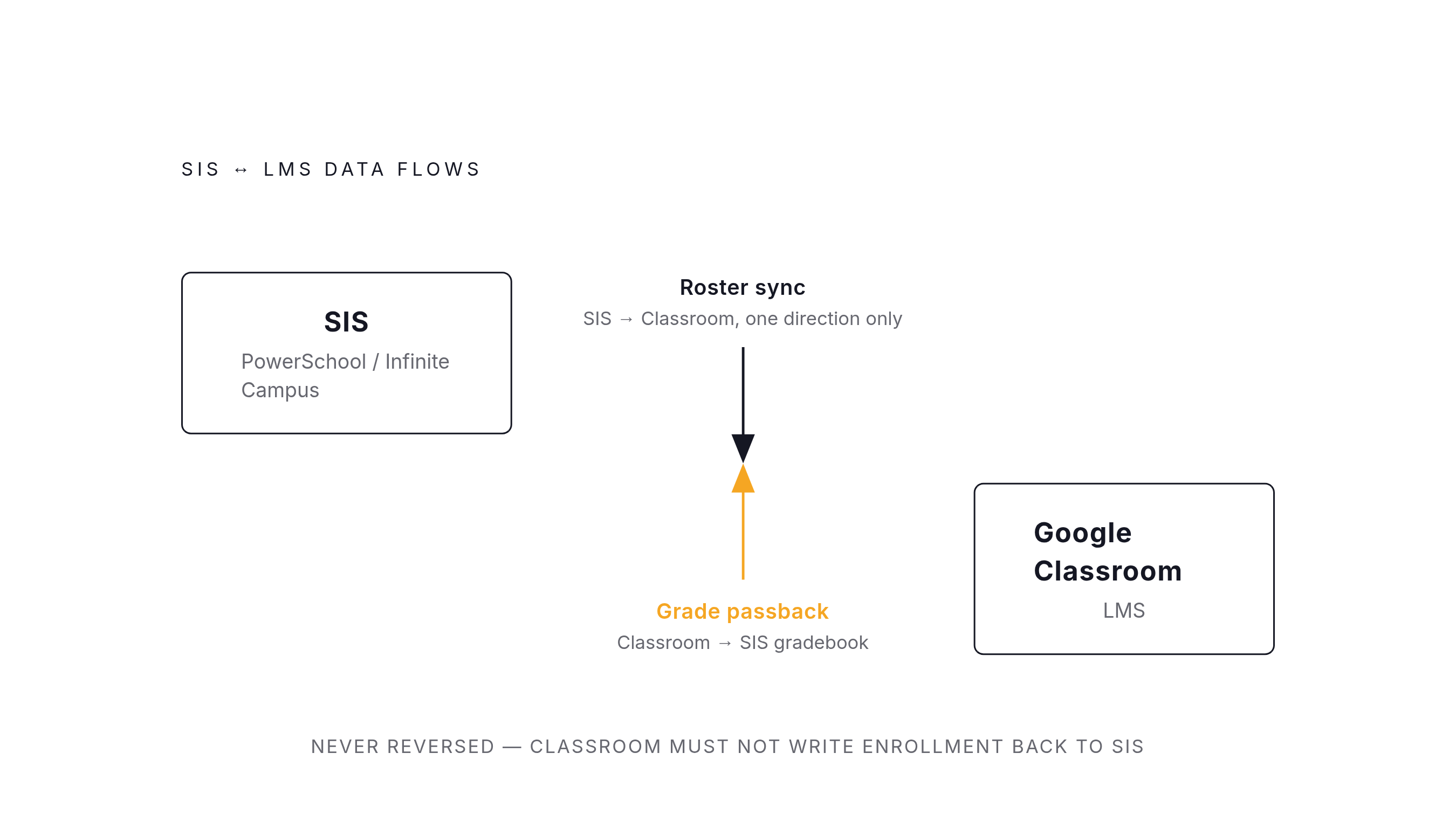
Roster data flows from the SIS to the LMS, never the reverse, because PowerSchool and Infinite Campus are the authoritative record and Google Classroom is not. Grade passback runs the opposite direction, from Classroom back to the SIS gradebook, and that is a separate data flow that deserves its own handling in the design rather than being appended to the roster sync.
Sync cadence involves a real tradeoff. Nightly batch is cheaper and simpler, and it covers most roster changes adequately, but a student who transfers mid-day remains in the wrong class list until the next sync runs. Hourly or real-time sync resolves that but requires event-driven architecture and costs roughly two to three times more to build. Most schools run nightly, and that is the appropriate default. Districts with high student mobility or frequent same-day schedule changes should build for hourly sync.
Data quality inside the SIS is where most integration failures originate. Duplicate student IDs, course names that do not match across systems, and enrollment records that were never properly closed all surface during the 4-to-8-week QA window that any serious SIS integration requires. Auditing PowerSchool or Infinite Campus data before standing up a gateway connection reduces the time spent chasing problems that originate upstream of the integration itself.
Licensing requirements deserve a checklist before any integration work begins:
Google Workspace for Education Plus or the Teaching and Learning Upgrade, required for grade export since July 9, 2024
Infinite Campus Campus Learning License, required to enable Google Classroom integration, with a 45-day provisional option for evaluation
PowerSchool Universal Rostering Connector, with read or write access enabled, the plugin installed, and version 24.5.1.0 or later recommended
Before selecting a gateway over a native connection, the decision should be made clearly. If the target is only PowerSchool plus Classroom, or only Infinite Campus plus Classroom, a native integration is sufficient once licensing is resolved, and adding a gateway on top of that adds cost without benefit. If the product must work across multiple SIS platforms or widely varying district configurations, a gateway like Edlink, Clever LMS Connect, or ClassLink reduces ongoing maintenance significantly. If state Ed-Fi reporting is part of the requirement, confirm the gateway or connector supports Ed-Fi v7 and not just OneRoster, since RosterStream's Extended Data layer exists specifically to cover that gap.
Where These Standards Are Heading
OneRoster and Ed-Fi are converging into one connected pipeline rather than remaining two separate standards a vendor must support independently. The Ed-Fi OneRoster Service, released in May 2026, serves a standards-compliant OneRoster feed directly from data already stored in an Ed-Fi ODS. A gateway or connector built to support both today is aligned with where the ecosystem is heading, not just accommodating what exists right now.
LTI Advantage is doing something similar for tool launch and roster access, combining what were previously two separate integration requirements into a single flow. The December 2025 partnership between Clever and Edlink reflects a broader market direction: district-facing platforms and vendor-facing APIs increasingly built on shared underlying infrastructure rather than competing for the same role.
The core discipline remains the same regardless of which tools are involved: identify one authoritative source and ensure every downstream system, gradebook, LMS, state reporting pipeline, reflects it accurately without drifting out of sync over time. Content marketing platforms like Letterbrace apply the same logic to multi-channel publishing: establish which system holds the canonical version of a piece of content, then verify whether search engines and AI models retrieve it accurately. The underlying question is identical across both domains: which system is the source of truth, and are all downstream systems actually reading from it correctly?
Methodology & sources
- Connect Classroom to your Student Information System (SIS) - Classroom Help
Provided details on Google Classroom's named SIS partners and the OneRoster-based connection setup process.
- Google Workspace Updates: Google Classroom now supports exporting grades and importing rosters and grade settings with PowerSchool SIS
Provided the July 2024 details on the PowerSchool-Google Classroom grade export and roster import integration, including OAuth setup steps and licensing requirements.
- Blackbaud Transforms K-12 Learning with Powerful Updates and Integrations | Blackbaud
Provided details on Blackbaud's Google Classroom integration announcement and its OneRoster 1.1 and LTI 1.3 Advantage certifications.
- https://kb.infinitecampus.com/help/oneroster-api
Provided the Infinite Campus setup steps for generating a OneRoster connection, including the consumer key, consumer secret, and OneRoster Base URL.
- https://docs.ed-fi.org/blog/2026/01/30/
Provided information on the Ed-Fi OneRoster Service field testing in early 2026 ahead of its May 2026 release.
- https://www.1edtech.org/blog/ed-fi-alliance-and-1edtech-simplifying-rostering-to-unlock-actionable-data
Described the deliberate convergence effort between the Ed-Fi Alliance and 1EdTech to integrate OneRoster 1.2 capability into the Ed-Fi ODS/API.
- https://www.prnewswire.com/news-releases/clever-introduces-universal-integration-solution-that-connects-edtech-solutions-with-any-k-12-school-302420154.html
Provided details on Clever LMS Connect's December 2025 launch, its grade passback and assignment sync capabilities, and its use of Edlink's Unified API.
- https://www.teachfloor.com/blog/what-is-edlink
Provided the statistic that Clever is used by over 100,000 schools.