Embedding Third-Party Tools Natively into EdTech Workflows
Schools waste $200K-$400K yearly on disconnected tools; native integration through LTI fixes it.
The average K-12 district accessed 2,982 distinct EdTech tools in 2024–25. Nearly three thousand tools. Students used around 48 of them over the course of a year. Educators used roughly 50.
And the number keeps climbing.
The problem isn't that schools are buying bad tools. The problem is those tools don't talk to each other. So everyone in the building spends a meaningful chunk of their day re-logging in, switching tabs, and re-entering context that has nothing to do with actual learning.
Native integration is what fixes this. Not buying fewer tools (though that helps). Not building a better portal. Actually embedding third-party tools into the core learning workflow so the tools come to the students and teachers, not the other way around.
So why doesn't that happen? Because institutions know they have too many tools, and they still add more every year.
The pandemic kicked off a wave of tool adoption that outpaced any coherent integration strategy. Schools were in survival mode. A tool solved a problem. It got purchased. Nobody asked how it connected to everything else. Then the next tool got purchased the same way. And the next.
Now districts are sitting on software libraries where only about 57% of tools are actively used. Mid-sized districts lose somewhere between $200,000 and $400,000 annually to unused licenses and the overhead that comes with them. That is not a rounding error on a school budget.
The instinct when you see that utilization gap is to assume the tool is bad. It usually isn't. Low usage almost always means the tool lives outside the workflow. When a teacher has to navigate away from their course, log into a separate system, run a report, and manually drag that data back into the gradebook, they stop doing it. Not because they're lazy. Because that sequence is genuinely unreasonable to repeat forty times a week. A disconnected toolset is like a kitchen where every appliance has its own separate power grid — technically functional, practically exhausting.
The operational weight compounds too. Each new tool brings its own privacy review, its own license management, its own training cycle. Add enough of them and you've created a part-time job out of just maintaining access, before anyone has learned anything.
Consolidating the toolset helps at the margins. But if the remaining tools still require separate logins and manual data exports, you've just got a smaller version of the same problem.
"Natively Embedded" Means Something Specific
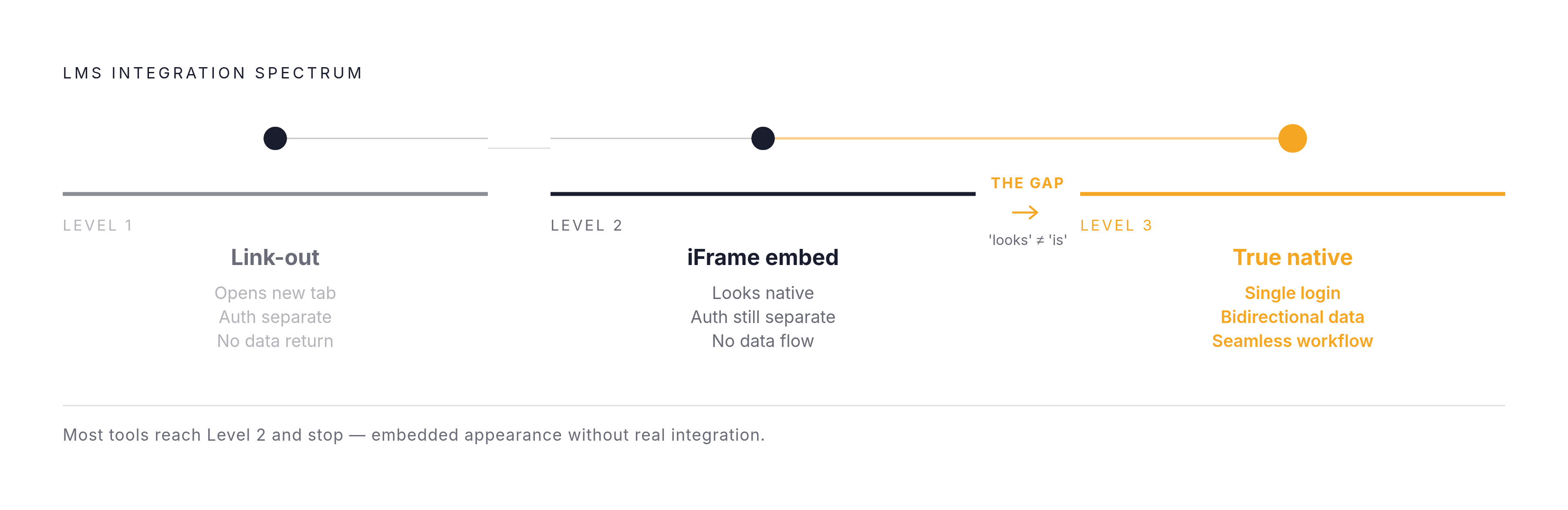
The term gets thrown around loosely. It shouldn't. There's a real spectrum here, and where a tool falls on that spectrum determines whether it's genuinely integrated or just cosmetically connected.
On one end: the link-out. User clicks something in the LMS, a new tab opens, they're gone. That's not integration. That's a bookmark with extra steps.
In the middle: the iframe embed. The tool appears inside the LMS shell, so it looks like part of the course. But authentication is separate. The student still hits a login screen. Data doesn't flow back automatically. Looks native. Isn't.
On the other end: true native integration. One login covers everything. Data moves in both directions without anyone manually moving it. The student never leaves the workflow to access the capability.
Three things make native embedding real:
Unified auth. One identity, one login. No separate account provisioning. No password resets for tools the student uses twice a semester.
Bidirectional data flow. Course structure, grades, and user behavior move across systems automatically. Not exported by hand. Not reconciled in a spreadsheet on Friday afternoon.
Consistent in-context experience. The tool is where the learning already happens, not a detour from it.
When all three are present, the tool disappears as a separate destination. It becomes invisible infrastructure. That's actually the goal. Not a shorter list of tools on a portal.
LTI Is the Protocol That Makes This Possible
Learning Tools Interoperability (LTI) is the technical specification that makes native embedding achievable at scale. It comes from the 1EdTech Consortium, and it's the reason you can click a link in Canvas and land inside a publisher's homework platform without ever entering a password.
Without LTI, every external tool is its own separate system. Its own user accounts. Its own login flow. Its own grade export mechanism. The institution either builds custom connectors for each one or tells teachers to manage it manually. Past a handful of tools, both options collapse under their own weight.
LTI standardizes all of that into a single launch sequence:
Teacher or student clicks a link inside the LMS
The LMS generates a launch message with identity and context information
The tool provider receives the message, validates who the user is, and returns content inside the LMS environment (usually as an iframe)
Data exchanges back through the same channel
LTI 1.3 is the current version. Previous versions are officially deprecated, though plenty of them are still running in production right now. The big upgrade in 1.3 was security: it introduced OAuth2 and JSON Web Tokens, which addressed real authentication weaknesses in earlier versions.
The 1EdTech Consortium has certified LTI implementations in more than 250 products. Every major LMS, Canvas, Moodle, Blackboard Learn Ultra, Brightspace, Schoology, Open edX, supports LTI 1.3.
The most important thing to understand about LTI: it is not a product to purchase. It's a protocol that already exists inside the infrastructure most institutions are already running. The foundation is there. The question is whether anyone is using it correctly.
LTI Advantage Is Where the Integration Gets Actually Useful
LTI by itself gets the tool into the LMS. LTI Advantage is what makes the tool a genuine participant in the course.
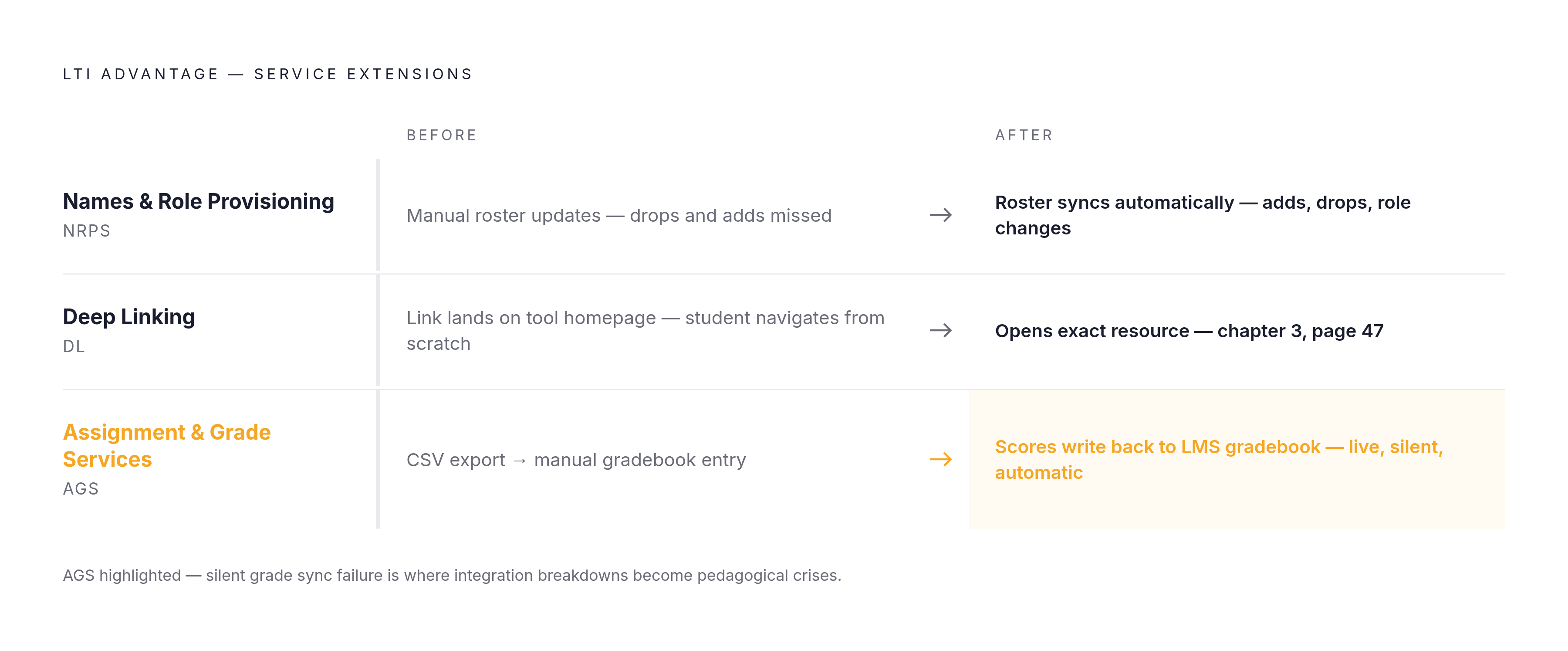
Advantage is a set of three service extensions built on top of LTI 1.3. Each one handles a specific problem that basic LTI leaves unsolved.
Names and Role Provisioning Services (NRPS) automates roster sync. When a student enrolls in a course, that enrollment propagates automatically into every connected third-party tool. Instructors don't manually add students to each external platform. Late adds get picked up. Dropped students lose access. The enrollment record is the enrollment record everywhere.
Deep Linking solves a problem that's easy to overlook until you've lived with it. Without it, an LTI integration typically drops users at the tool's homepage. The instructor embeds the tool, not a specific piece of content inside it. Deep Linking lets the instructor browse the tool's content library from inside the LMS, select exactly the resource they want, and embed that specific resource directly into the course. The difference between linking to a textbook publisher's homepage and linking to page 47 of chapter 3 is not small. It's the difference between a useful integration and one that creates extra work every single time.
Assignment and Grade Services (AGS) is what makes the gradebook whole. Scores generated inside the third-party tool update the LMS gradebook dynamically. No CSV. No manual entry. No end-of-week reconciliation. The grade appears where it's supposed to appear.
Together, these three services mean the external tool participates in course structure, not just course access. It's part of the grade record, the enrollment record, the content hierarchy. The 1EdTech community has continued investing in making these integrations reliable: the TAMS LTI Diagnostics suite, introduced at the 1EdTech Learning Impact conference, now includes testing coverage for all three Advantage services specifically because even certified products can break in production.
xAPI and Caliper Handle What LTI Can't See
LTI is excellent at launching tools, passing identity, and writing grades. What it doesn't capture is everything that happens in between. Time on task. Attempt sequences. Where a student got stuck. Activity on a mobile device or offline. The texture of how learning actually happened, not just whether an assignment got submitted.
xAPI and Caliper fill that gap, and they're worth understanding as distinct tools rather than interchangeable ones.
xAPI (standardized as IEEE 9274.1.1-2023) tracks learning activity across any context: inside the LMS, outside it, on mobile, offline, in simulations. An xAPI statement is essentially a record that says "this learner did this thing in this context." Those statements accumulate into a picture of how learning actually unfolded. Caliper Analytics, from the 1EdTech Consortium, defines a common vocabulary and data format for learning events across platforms. It includes a Sensor API for transmitting those events to analytics endpoints. Where xAPI is broad and context-agnostic, Caliper is the structured framework within the 1EdTech ecosystem specifically. Which one you lean on depends on the institution's analytics infrastructure and which ecosystem it's primarily operating in.
What both enable is meaningful: a continuous record of learning behavior that moves across systems automatically. Admins can see patterns. Educators can see where students struggle. Publishers can see how content actually gets used. None of that requires a manual data pull.
The fullest picture of native embedding needs both layers. LTI handles the experience layer. xAPI and Caliper handle the evidence layer. One without the other leaves a gap that's invisible until someone needs the data and it isn't there.
What This Looks Like When It's Actually Working
Here's what the integration looks like when it's done right.
Publisher content. An instructor teaching in Canvas or Blackboard embeds a Pearson MyLab or Cengage MindTap assignment directly in the course module. Students complete it without leaving the LMS. The grade appears in the gradebook automatically through LTI AGS. The instructor never touches a spreadsheet. The student never sees a separate login screen. That's the scenario the whole architecture is designed to produce, and it works exactly like that when the integration is set up correctly.
Video conferencing. Zoom, Microsoft Teams, and BigBlueButton all use LTI to embed virtual classroom sessions inside course pages. One click joins the session. Attendance data and recording links return through the integration automatically. No separate calendar invite to manage. No external platform to explain to students every time.
George Mason University's implementation of a virtual classroom LTI integration is a clean real-world example. Faculty placed the tool in their courses without heavy IT support to configure it each time. Senior Instructional Technologist Jim McLean noted the implementation received very positive feedback. That outcome happens when the integration is genuinely low-friction for the people doing the embedding. When it isn't, the feedback sounds very different.
AI, which is the current frontier. In July 2025, Instructure and OpenAI announced a global partnership embedding OpenAI's LLM capabilities directly into Canvas. The first tool is an LLM-enabled assignment that creates a custom GPT-like experience inside the LMS, with learner data staying private to the Canvas user and not shared with OpenAI. As students interact with the AI, learning evidence is captured and returned to the gradebook. AI activity becomes part of the assessment record, not a parallel experience that instructors have to account for separately.
The pattern across all three is the same. The tool stops being a destination. The capability shows up where the learning already is.
Where Native Embedding Still Falls Apart
Integration fails more often than it should, and the failures are rarely obvious when they happen.
When a tool doesn't support LTI, teams have to build custom authentication logic from scratch, maintain separate APIs for user and course data, and handle grade transfer outside LMS workflows entirely. Every non-LTI tool becomes its own engineering project. Manageable for one tool. Not manageable for thirty.
LTI 1.3 is the current standard, but plenty of older versions are still running in production. Interoperability problems emerge when one side of the integration has upgraded and the other hasn't. These gaps don't announce themselves. They surface as weird behavior that takes time to diagnose, usually at the worst possible moment in the semester.
Certification doesn't guarantee a clean implementation either. The TAMS Diagnostics suite exists precisely because certified products still exhibit interoperability failures in production. The spec defines what should happen. Diagnostics catch what actually happens. Those aren't the same document.
The cost of a broken integration isn't just technical. When grade sync fails silently, the failure surfaces as a pedagogical problem. An instructor discovers a grading gap three days into a unit. Students who completed work have no recorded grade. That's not an IT ticket. That's an instructor spending hours they don't have reconstructing a record that was supposed to be automatic.
The institutions carrying the most risk right now are the ones that adopted tools rapidly during 2020 through 2022 without standardizing on LTI. They now have a mixed estate: some tools connected through LTI, others connected through custom integrations built under pressure, all of them behaving slightly differently and requiring different maintenance to keep running. Nobody made a bad decision in 2020. But those decisions have a tab coming due.
What EdTech Builders Have to Resolve Before This Actually Works
For the teams building the tools: supporting LTI 1.3 plus all three Advantage services isn't the ceiling. It's the floor. Anything below that limits how deeply the tool can participate in the course lifecycle.
Auth unification has to work every time. If a student hits a separate login prompt inside an embedded tool, the seamlessness breaks at exactly the moment it's supposed to matter. There is no acceptable exception rate here.
Rostering at scale introduces edge cases that don't appear in a demo integration. Late-add students. Dropped courses. Role changes mid-semester. These scenarios happen constantly at real institutions. The integration has to handle them without manual intervention, because at any meaningful scale the volume of exceptions becomes its own full-time problem.
Grade writeback has to be reliable, and it has to fail loudly when it fails. An AGS failure that's invisible to the instructor until they're reconciling grades is not acceptable. Error handling and retry logic aren't optional features. They're the difference between a tool that works and a tool that quietly erodes trust until someone decides to stop using it.
Then there's the maintenance reality that product teams underestimate. LMS platforms update. The tool updates. The integration sitting between them has to track both. This is not a one-time build. It is ongoing operational work, and if it isn't resourced as such, the integration drifts until it breaks in ways that are expensive to diagnose. Treating the integration as a launch deliverable rather than a live dependency is how you end up with a tool that worked great in year one and causes problems by year three.
The decision point for product teams: build and maintain each LMS connector independently, or adopt integration infrastructure that handles the protocol layer and keeps connectors current as platforms evolve. Neither path is free. But one of them compounds the right way over time.
How to Tell Whether Your Current Integrations Are Actually Native
The test is behavioral, not contractual. The vendor said it's integrated. That doesn't make it integrated. You have to look at what actually happens when a real student or instructor uses it.
Start with three questions:
Does a student encounter a separate login to use this tool?
Does a grade appear in the gradebook automatically?
Does the instructor's roster sync without manual intervention?
Every "no" is a fragmentation point. Every fragmentation point is a place where the experience breaks and someone patches it with effort, usually effort that doesn't show up anywhere in any report.
Audit the data flow, not just the tool list. A tool that launches inside the LMS but exports grades via CSV is not natively embedded. The embedding is cosmetic.
Check LTI version coverage. Tools still running deprecated LTI versions are exposing the institution to authentication vulnerabilities and missing the Advantage capabilities entirely. No roster sync, no gradebook writeback, no deep linking. None of those benefits exist below LTI 1.3 with Advantage services enabled.
Use the utilization data as a diagnostic. The figure showing only 57% of tools actively used isn't just a waste metric. It's a map. The tools with low utilization are almost always the ones that require students to leave the LMS. Location is a proxy for whether the integration is real.
Fewer context switches is what you're actually optimizing for. A smaller, well-integrated set where every tool participates in the same identity system, the same gradebook, and the same data record is what converts a sprawling toolset into a coherent learning environment — the way individual instruments, each playing separately, become an orchestra only when they share the same conductor and the same sheet music. The technology to do this exists. The protocol is already in the infrastructure. What's left is the decision to use it properly, and the follow-through to make sure it stays working.